Some contacts fill your inbox far more than others. A handful of people, newsletters, or internal threads usually account for a big share of everything you receive. Knowing exactly who those top senders are is the first step to a calmer inbox, faster replies, and a clearer picture of where your time goes.
This guide shows you how to find who sends you the most emails in Gmail and Outlook, three ways: manually in each platform, and automatically with a report that does the counting for you.
Why it helps to know your top senders
Finding your most frequent senders is not just inbox trivia. It tells you:
- Where the noise comes from. If three newsletters generate a quarter of your incoming mail, you know exactly what to unsubscribe from or filter.
- Which relationships need attention. A client or colleague who emails you constantly may be waiting longer than they should for replies.
- How work is really distributed. Managers use top-sender data to see who generates the most requests and whether the load is balanced.
Once you can see it, you can act on it. Let's get the data.
How to find your top senders in Gmail
Gmail does not have a built-in "top senders" report, so the native options are manual. Here is what actually works.
Count a single sender with search operators
If you already have a suspect in mind, type this into the Gmail search bar:
from:name@example.comshows every email from that address.from:name@example.com after:2026/01/01narrows it to a time range.from:(@example.com)catches everyone at a whole domain, useful for a company or a client.
Gmail lists the matching messages so you can gauge the volume. The catch: you can only check one sender at a time, and Gmail will not add them up or rank them for you. The full list of Gmail search operators is worth bookmarking for this.
Spot patterns with the sender column
Open a label or your inbox and scan the sender names down the left side. For a rough read you can search a keyword, then eyeball which names repeat. It works for a quick gut check, but it is guesswork, not a real count.
The honest takeaway: Gmail can confirm how much one person emails you, but it cannot rank all your senders on its own. That is exactly the gap a dedicated report fills, which we cover below. For more on what Gmail can and cannot measure, see our piece on whether Gmail has email analytics for teams.
How to find your top senders in Outlook
Outlook gives you a bit more to work with, because you can sort and group by sender.
Sort or group by sender
- Outlook desktop: open a folder, go to View > Arrange By > From, or click the From column header to sort. Messages group under each sender so repeat offenders stack up together.
- Outlook on the web: use Filter > Sort > From to group messages by sender.
You can also right-click a message and choose Find Related > Messages from Sender to pull everything from one contact. Microsoft's own guide to sorting and grouping messages walks through the options.
The limitation is the same as Gmail: sorting groups your mail visually, but it will not hand you a ranked count of who sends the most. For that, see our guide to tracking email analytics in Outlook.
The automatic way: a Top Senders report
Both Gmail and Outlook can show you individual senders, but neither ranks all of them for you. When you want the actual list, sorted by volume, without doing the counting by hand, that is where Email Meter comes in.
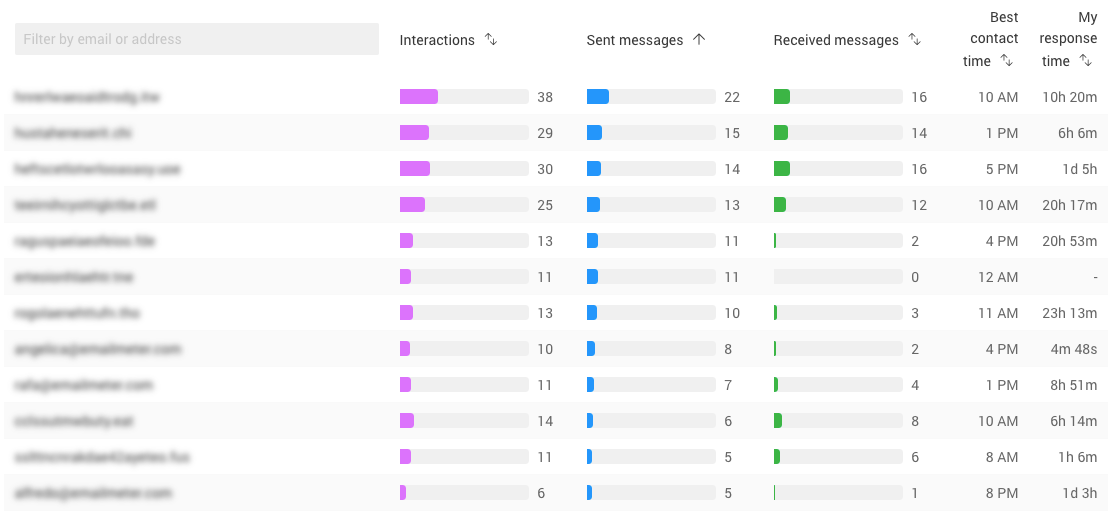
Email Meter connects to your Gmail or Outlook and produces a Top Interactions report automatically. In it you can see:
- Top senders: the addresses and domains that send you the most email, ranked.
- Top receivers: who you send the most to, so you can spot your busiest relationships.
- Volume by contact: how much overall traffic each person or domain generates in your inbox.
- Response time per contact: how long you take to reply to each one, so you can see who is waiting too long.
It works across your whole history, not just recent mail, and it covers both Gmail and Outlook. For teams, the same view rolls up across everyone, so a manager can see who generates the most requests and whether the workload is balanced.
What to do once you know your top senders
The list is only useful if you act on it. A few moves that pay off:
- Cut the noise. Unsubscribe from or filter the high-volume senders that add no value. Our guide to cutting spam and organizing your inbox has the steps.
- Fix slow replies to key contacts. If an important client is a top sender and your reply time to them is high, that is a relationship risk. Learn how to measure and improve response times.
- Rebalance the team. If one person absorbs most of the incoming volume, that is a workload signal worth acting on. See how teams measure and reduce time spent on email.
See your top senders in one report
You can dig through Gmail search operators or Outlook sorting one contact at a time, or you can let a report rank every sender for you and show the response times alongside. If you manage a busy inbox or a team, the automatic route saves hours and surfaces things manual scanning misses.
Request a demo of Email Meter to see your top senders, top receivers, and response times in a single dashboard.