
Most managers have no idea how their team actually handles email. They know emails are being sent and received. They know customers occasionally complain about slow responses. But they have no systematic view of who is handling what, how quickly, and whether the workload is distributed fairly.
Monitoring employee email activity closes that gap. Not to spy on individuals, but to give managers the data they need to lead better, spot problems early, and make decisions based on facts rather than guesswork.
This guide covers what employee email monitoring looks like in practice, what is legal, what to measure, and how to do it without disrupting your team.
Is it legal to monitor employee emails?
This is the first question most managers ask and rightly so.
United States
Employers generally have the legal right to monitor business email accounts on company systems, provided employees are informed of the monitoring policy. Most US employment law follows the principle that there is no reasonable expectation of privacy on employer-owned systems when a clear policy exists.
European Union
The General Data Protection Regulation (GDPR) applies. Monitoring is permitted but must be proportionate, documented, and disclosed to employees. Blanket surveillance of email content is generally not compliant, but monitoring performance metrics (response times, volume, activity patterns) without reading email content sits in a different category and is generally permissible.
United Kingdom
The Regulation of Investigatory Powers Act and the Data Protection Act 2018 apply similar principles monitoring must be disclosed and proportionate.
The practical takeaway
Monitoring email performance metrics, who replied to what, when, and how fast, is very different from reading email content. The former is standard management practice. The latter requires much more careful legal consideration. Before implementing any monitoring programme, consult your legal counsel and ensure your employee handbook includes a clear email monitoring policy.
What employee email monitoring actually means for managers
Content monitoring vs activity monitoring
There are two fundamentally different types of email monitoring.
Content monitoring means reading the actual body of emails, what was written, to whom, about what. This is the type of monitoring most people imagine when they hear the phrase. It is invasive, legally complex, and rarely necessary for operational management purposes.
Activity monitoring means tracking metadata and performance metrics: how many emails were sent and received, how quickly team members replied, what percentage of emails went unanswered, how workloads are distributed across the team. This is the type of monitoring this guide covers.
How Email Meter approaches this
Email Meter operates exclusively at the activity monitoring level. It never reads the body content of emails. It connects to Gmail or Microsoft 365 and tracks metadata only, sender, recipient, timestamp, and whether a reply was sent.
What to monitor: the five metrics that matter
Email volume by team member
How many emails is each person sending and receiving? Volume data reveals workload distribution, who is carrying the heaviest load, who has capacity, and where imbalances exist. A team member receiving 200 emails a day while a colleague receives 40 is a structural problem, not a performance one.
Response rate
What percentage of received emails does each team member reply to? A low response rate is often the first visible signal of an overloaded inbox. Combined with volume data, it tells you whether someone is struggling to keep up or simply deprioritising certain types of emails.
Median response time
How long does it take each team member to send a first reply? This is the metric most directly linked to customer satisfaction. According to SuperOffice's Customer Service Benchmark Report, the average company takes 12 hours to respond, while customers expect a reply in under 1 hour. Tracking response time benchmarks by team member shows you exactly where the gaps are.
Unreplied emails
Which emails have received no response at all and how long have they been waiting? Unreplied emails are the highest-risk items in any customer-facing team's inbox. A thread waiting 48 hours without a reply is a churn risk. A thread waiting 200 hours is a crisis. For a complete system to manage unreplied emails across your team, see our guide on how to make sure your team never misses a follow-up email.
Workload distribution over time
How does email volume and response performance vary by day of week and hour of day? This data reveals structural patterns: Monday morning spikes, Friday afternoon drops, coverage gaps during lunch or across time zones. It is the basis for staffing decisions and schedule optimisation.
How to spot workload imbalances across your team
Workload imbalance happens when a few people absorb most of the incoming email while others sit well below capacity. It rarely shows up in a headcount or account-count spreadsheet, but email analytics makes it visible in four steps:
- Compare email volume per person. Pull received and sent volume per team member per week. If one person handles 180 emails while another handles 50, that gap is your imbalance.
- Cross-check against response time. High volume together with rising response time means that person is past capacity, not just busy. That is the signal to redistribute, not the raw volume alone.
- Watch the unreplied count. A growing backlog of unanswered emails on one person's plate confirms the overload before customers feel it.
- Look at the trend, not one week. Imbalance builds slowly as the most responsive person quietly attracts more requests, so review volume per person monthly.
One caution: high volume does not always mean bottleneck. Sometimes it is the only person who knows how to handle a certain request type, and the fix is cross-training rather than reassignment. Email Meter surfaces volume per team member, response times, and unreplied emails automatically across Gmail and Outlook, so these imbalances show up in the dashboard instead of after someone burns out.
How to monitor employee email activity in Gmail and Microsoft 365
Neither Gmail nor Outlook provides team-level email performance data natively. Gmail's admin console shows basic delivery logs. Microsoft 365 has some reporting features but they are not designed for manager-level performance monitoring.
Email Meter connects to both platforms and provides a unified view of team email activity, across individual inboxes and shared mailboxes simultaneously.
The Team View: your starting point
The Email Meter Team View gives managers a single dashboard showing each team member's email activity side by side. For each person, you see received emails, sent emails, replied emails, median response time, and response rate.
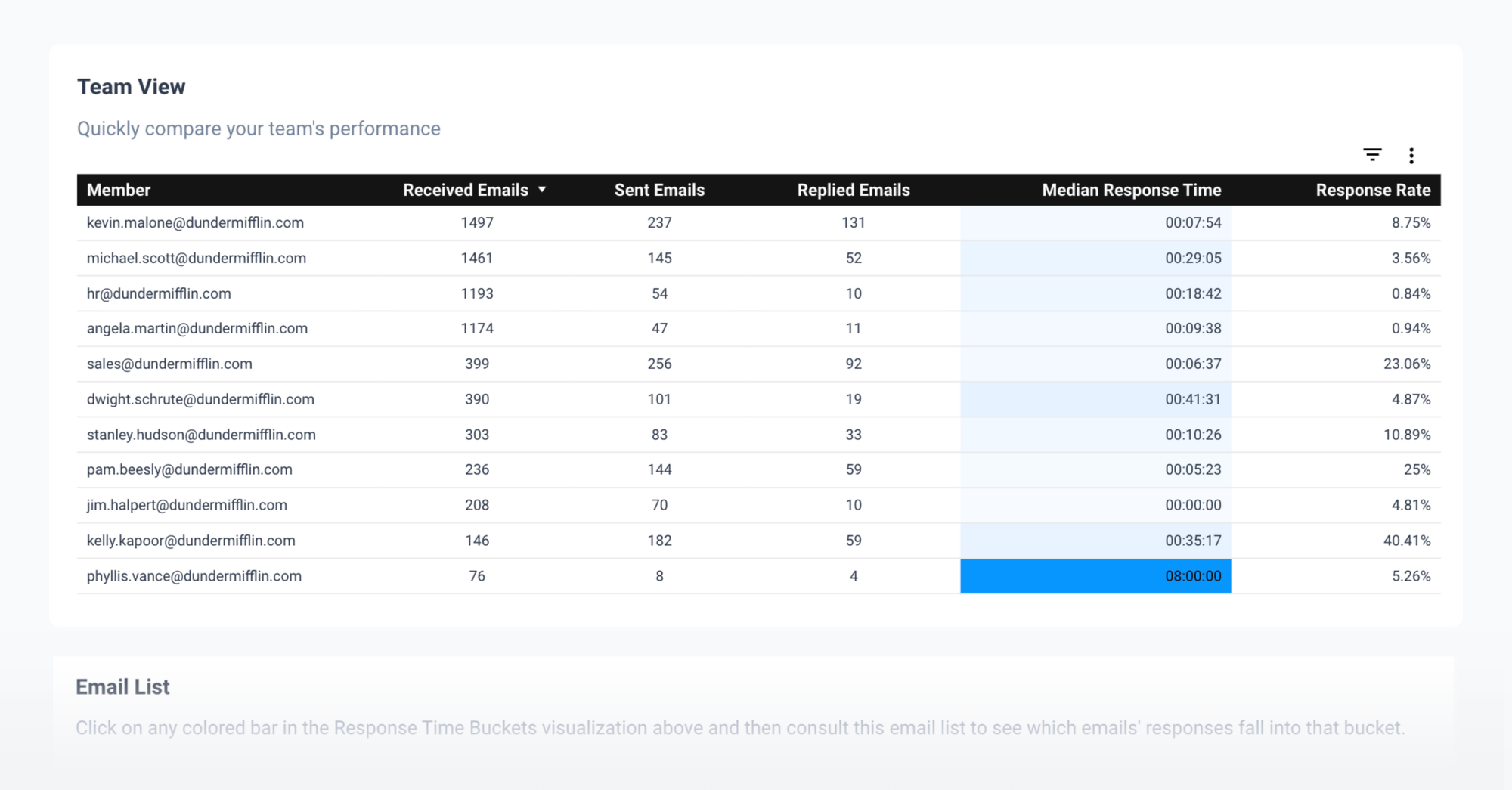
This view is available on the Plus plan and above accessible on free trial. It answers in seconds the questions that used to require manual spreadsheet work or individual check-ins.
What the Custom Dashboard adds
For managers who need deeper analysis, workload distribution over time, unreplied email age by team member, SLA compliance tracking, the Custom Dashboard plan provides additional views. These are covered in our guide on how to measure email response times by team and channel.
How to use this data without damaging team trust
The most common mistake managers make with email monitoring data is using it punitively. This creates anxiety, damages trust, and ultimately makes performance worse. The right approach treats email activity data as a diagnostic tool, not a scorecard.
Share the data with the team
When team members can see their own metrics alongside the team average, they self-correct naturally. Transparency removes the sense of being watched and replaces it with a shared understanding of where the team stands.
Use it to identify structural problems, not individual failures
If one team member consistently has a lower response rate than others, the first question is not "why aren't they working harder" but "what is different about their situation." More emails, more complex queries, less support, these are the root causes most data points to.
Set targets before measuring
Define what good looks like before you start tracking. A median response time target of 4 hours for external emails and 24 hours for internal emails gives everyone a clear benchmark. Teams that know what they are aiming for consistently outperform teams that do not. For guidance on setting SLA response time targets, see our dedicated guide.
Review data weekly, briefly
A 10-minute weekly review of the team dashboard, shared openly, is more effective than any monthly performance review. It catches problems early, celebrates improvements, and keeps reducing email response times a visible team priority rather than a management concern.
Employee email monitoring for remote and hybrid teams
For teams working remotely or across time zones, email activity monitoring takes on additional importance. Managers lose the passive visibility they get in a shared office. Email activity data partially replaces that visibility.
What to watch for in remote teams
Response time gaps that align with time zone boundaries signal coverage gaps rather than individual performance. Volume spikes suggest one person is absorbing work others are missing. Declining response rates can be an early signal of disengagement or burnout before it becomes visible in other ways.
Why activity monitoring is the right tool for remote managers
For remote teams, monitoring email activity, not content, is one of the least invasive and most informative performance signals available to managers. It is objective, consistent, and does not require check-ins or status updates.
Industry benchmarks: what good looks like
Sources: SuperOffice Customer Service Benchmark Report 2023, Toister Performance Solutions, HubSpot State of Service 2023.
FAQ
What is employee email monitoring?
Employee email monitoring is the practice of tracking email activity metrics, volume, response times, response rates, and workload distribution, across a team. It is distinct from content monitoring, which involves reading the body of emails. Activity monitoring tracks metadata only and is standard management practice in customer-facing teams.
How do you identify workload imbalances across a team?
Compare email volume per team member over a week or month. If one person handles 180 emails while a colleague handles 50, that gap is a workload imbalance. Cross-check high volume against response time: when volume is high and response times are climbing, that person is past capacity and work should be redistributed. A rising count of unreplied emails on one person's plate confirms the overload. Email Meter surfaces volume per person, response times, and unreplied emails automatically across Gmail and Outlook, so imbalances show up in the dashboard before they turn into burnout.
Can my employer monitor my work email without telling me?
In most jurisdictions, employers are required to disclose monitoring policies to employees. In the US, disclosure requirements vary by state. In the EU and UK, GDPR and data protection law require that monitoring be disclosed, proportionate, and documented. Always consult legal counsel before implementing a monitoring programme.
Does Email Meter read the content of employee emails?
No. Email Meter tracks metadata only, sender, recipient, timestamp, and whether a reply was sent. It never reads the body content of emails. This makes it compliant for use in environments with strict privacy or data protection requirements, including legal, financial services, and healthcare.
What is the difference between monitoring Gmail and Outlook?
Gmail's Admin Console provides basic delivery logs but no team performance analytics. Microsoft 365 has some reporting features but they are not designed for manager-level monitoring. Email Meter connects to both platforms and provides a unified team performance view with the same metrics regardless of which platform your team uses.
How many team members can I monitor with Email Meter?
Email Meter scales from small teams to large enterprises. The Team View on the Plus plan covers individual and shared mailboxes. For organisation-wide monitoring with custom dashboards and SLA tracking, the Custom plan is designed for larger teams. Contact sales for enterprise pricing.
Will my team know they are being monitored?
Email Meter is connected at the account level and team members can see their own data. We recommend being transparent with your team about what is being tracked and why, this improves trust and engagement with the data. Monitoring works best as a shared visibility tool, not a surveillance mechanism.
Monitoring employee email activity is not about surveillance. It is about giving managers the visibility they need to lead effectively — to spot overloaded team members before they burn out, to identify response time problems before customers escalate, and to make workload decisions based on data rather than instinct.
Email Meter gives you that visibility, directly from Gmail and Microsoft 365, without reading a single email.
Start your free trial, see your team's email activity in minutes with the Team View.
Book a demo, we'll walk you through the full monitoring dashboard with your own data.