Quick Answer
What are the early warning signs of customer churn in email data?
- Declining email engagement, a client whose email volume drops 40%+ over 90 days is a churn risk, even if they haven't said anything.
- Response time asymmetry, when your team consistently takes longer to reply to a specific account than to others, that account notices.
- Escalation signals, increasing urgency, repeated follow-ups on the same issue, references to unresolved threads, these appear in email data before any cancellation request.
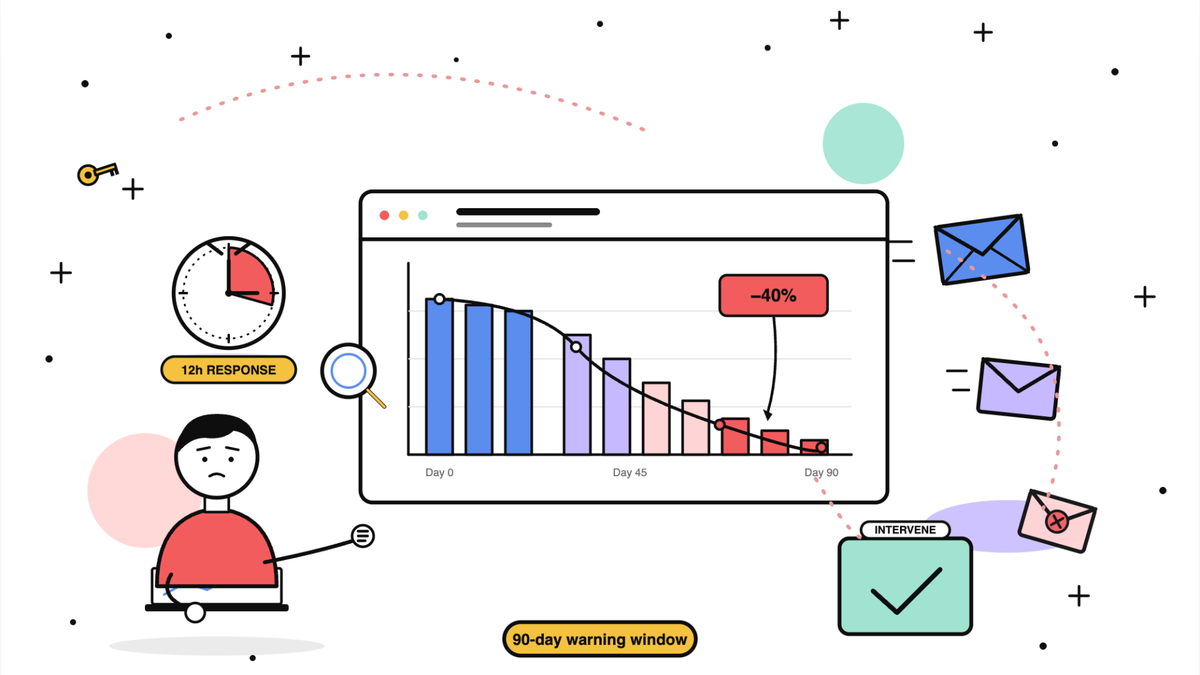
- The 90-day window, 85% of churned accounts showed a 40% decrease in email engagement during the 90 days before termination. That window is the intervention opportunity most teams miss.
- What to do: monitor response time trends by client account, not just team averages, and track the email metrics that predict churn before it happens.
Most teams discover churn signals too late. A customer sends a cancellation email, the team reviews the account, and the warning signs were there for months, emails that took days to answer, support threads that never fully resolved, a key contact who gradually stopped engaging.
Email Meter's data across customer accounts reveals that 85% of churned accounts showed a 40% decrease in email engagement during the 90 days before termination. That 90-day window is the intervention opportunity most teams miss entirely, because they are not watching the right signals.
Knowing how to reduce churn and prevent customer churn starts with understanding where those signals actually live. For most customer-facing teams, they live in email, the primary communication channel and the one with the least visibility.
For a complete guide on which email metrics CS teams should track to prevent churn, see our email analytics for customer success teams guide
This guide covers the link between email response time and churn, the early warning signals hiding in your email data, and the system that leading customer-facing teams use to intervene before it is too late.
Does email response time affect customer churn?
Yes and the evidence is consistent across industries and company sizes.
Why slow email response times drive silent churn
According to SuperOffice's Customer Service Benchmark Report, the average company takes 12 hours to respond to a customer email while customers expect a reply in under 1 hour. Research from Toister Performance Solutions found that customers who wait more than 10 minutes for an initial response are 50% more likely to churn within 6 months. HubSpot's State of Service report found that 61% of customers stop buying from a company due to poor customer service and slow response times are consistently cited as the top driver.
What makes email response time particularly dangerous as a churn driver is that it operates silently. Most customers do not complain about slow responses. They absorb the frustration, file it away, and quietly begin evaluating alternatives. By the time they send a cancellation email, the decision has already been made.
Response time benchmarks that protect retention
| Client tier | Target response time | Churn risk threshold | Source |
|---|---|---|---|
| Enterprise | Under 2 hours | Over 4 hours | Zendesk CX Trends 2025 |
| Mid-Market | Under 4 hours | Over 8 hours | SuperOffice Benchmark Report |
| Small Business | Under 8 hours | Over 24 hours | Toister Performance Solutions |
| Inbound leads | Under 1 hour | Over 5 hours | Harvard Business Review |
Teams that consistently meet these targets across all client tiers report significantly lower churn rates than those relying on averages, because averages hide the outliers that cost the most.
Customer churn warning signs hidden in your email data
Long before a customer sends a cancellation request, their email behavior changes. Three signals appear consistently in the data of accounts that eventually churn.
Declining email engagement
A client who used to respond within hours and now takes days is telling you something. A client whose email volume with your team has dropped by 40% over three months is a churn risk, whether or not they have said anything to indicate dissatisfaction. This is the earliest and most reliable signal available in email data.
Response time asymmetry
When your team consistently takes longer to respond to a specific client than to others, that client notices, even if they never mention it. If your enterprise clients are receiving the same response times as your small business accounts, you have a structural problem that puts your highest-value relationships at greatest risk.
Escalation signals in email content
Before a customer asks to cancel, they often signal their frustration in the language of their emails, increasing urgency, repeated follow-ups on the same issue, references to previous unresolved conversations. These patterns are visible in email data before they become explicit churn requests.

Email Meter's AI-powered escalation detection automatically flags emails that signal churn risk, legal threats, or cancellation intent, giving managers time to intervene before the situation becomes irreversible.
How do leading customer-facing teams prevent customer churn with email data?
The following teams used email response time data to prevent churn before it happened. The pattern across all five cases is the same: visibility came first, improvement followed. None hired more people or changed their communication platform.
| Company | Industry | Action taken | Result |
|---|---|---|---|
| Payday HCM | Financial Services | Shared response time data with teams, set 2-hour SLA target | -71% response time, direct reduction in client follow-up volume |
| Marda Management | Real Estate | Monitored customer wait time through 100% growth in email volume | -2% customer wait time despite doubling email load |
| Entirety | Consulting | Tracked 4-hour SLA compliance, reviewed data monthly with team | +48% response time improvement, consistent SLA compliance |
| Avery Dennison | Manufacturing | Identified internal bottlenecks causing delays in customer responses | -5.1% team response time, -8.2% customer wait time |
| Outreach | E-Commerce | Applied response time KPIs to customer service team | -30% response time, stronger client relationships |
How do you identify which accounts are most at risk of churning?
Monitor email engagement by client account
The most effective early warning system is tracking email engagement trends at the account level, not just team averages. When a previously active client's email engagement drops significantly over a 30, 60, or 90-day window, that is a flag to reach out proactively before the relationship deteriorates further.

Segment SLA compliance by customer tier
Not every client needs the same response time, but your highest-value clients almost certainly need faster responses than your team is currently delivering. The question is whether you know which tier of clients is receiving which level of service.

The gap between Enterprise (95%) and Small Business (62%) is a churn risk distribution map. Accounts in the lower SLA compliance band are the ones most likely to leave and the ones whose departure will hurt most if they are mid-market or enterprise clients misclassified into the wrong tier.
How do you build a system to reduce and prevent customer churn?
Monitor engagement trends, not just point-in-time metrics
A single slow response is not a churn signal. A pattern of declining engagement over 60 to 90 days is. Set up a regular review, weekly or monthly, of response time trends for your top accounts. A client whose response time from your team has been creeping up over two months needs attention before they say anything.
Set a response time policy with differentiated targets by client tier
Define what good looks like before you start measuring. Enterprise clients should have tighter response time targets than small business accounts. For industry standard SLA benchmarks by sector, see our dedicated guide.
Flag escalation signals before they become cancellation requests
Use Email Meter's AI-powered escalation detection to surface emails that contain churn risk language, repeated frustration signals, or unresolved issues before a customer explicitly asks to cancel. The goal is to intervene during the 90-day window before churn, not after the decision has been made.
Eliminate unreplied emails for high-value accounts
For your most important clients, unreplied emails are a direct churn risk. A high-value client whose email has been sitting unanswered for 48 hours is a relationship in danger. See our guide on how to make sure your team never misses a follow-up email for a complete system.
Review response time data with your team weekly
Teams that review email response time data together weekly consistently outperform teams that review it monthly. When everyone can see which accounts are falling behind, the team self-corrects naturally.
FAQ
How does email response time affect customer churn?
Slow email response times are one of the strongest predictors of customer churn. Customers who receive consistently slow responses are significantly more likely to leave often without explicitly saying so. The pattern typically emerges 60 to 90 days before a cancellation request, as email engagement decreases and frustration accumulates silently.
What is customer churn?
Customer churn is the rate at which customers stop doing business with a company over a given period. It is calculated by dividing the number of customers lost during a period by the number of customers at the start of that period, expressed as a percentage. In B2B SaaS, a monthly churn rate above 2% is generally considered high.
What is a good email response time to prevent churn?
For enterprise and high-value B2B clients, a response time under 2 hours is the standard most associated with strong retention. For mid-market accounts, under 4 hours. For small business accounts, under 8 hours during business hours. The most important principle is consistency, a client who always receives a reply within 3 hours trusts your team more than one who sometimes gets a reply in 30 minutes and sometimes waits 12 hours.
How can I tell if a client is at risk of churning based on email data?
The clearest signals are declining email engagement over 60 to 90 days, increasing urgency or frustration in email language, and SLA compliance rates below your defined threshold for that client tier. Email Meter surfaces these signals automatically through its CRM integration and AI-powered escalation detection.
Does improving email response time actually reduce churn?
Yes. Payday HCM cut response times by 71% and saw a direct reduction in client follow-up volume. Marda Management maintained client wait times through 100% growth in email volume. Entirety achieved a 48% response time improvement and reported stronger client relationships as a direct result.
What is the difference between response time and customer wait time?
Response time measures how long it takes your team to reply during business hours. Customer wait time measures the total elapsed time a customer waits for a response, including evenings and weekends. For B2B teams on a 9-to-5 schedule, customer wait time is often significantly higher than response time and it is the metric customers actually experience. Email Meter tracks both.
How do I start tracking email response time to prevent churn?
Connect Email Meter to your Gmail or Microsoft 365 account. It begins measuring response times automatically from day one, no manual tracking, no spreadsheets. You will see average and median response time by team member, SLA compliance rates by client tier, and engagement trends by account.
How to improve customer retention in a SaaS business using customer success platforms?
The most effective customer retention strategy in SaaS combines proactive outreach with email engagement monitoring. Customer success platforms help by centralizing account health data, but most miss the email layer entirely. The accounts most likely to churn are those where your CS team's response times have been creeping up and email engagement has been dropping, often 60 to 90 days before any explicit signal. Email Meter surfaces these patterns automatically from Gmail and Microsoft 365, giving CS teams the visibility to intervene before the decision to leave is made. For a complete retention framework, see our email analytics for customer success teams guide. For the business-level metrics that contextualize churn, see our customer success metrics guide and our customer service performance metrics guide. For how CSAT and NPS relate to churn signals, see our CSAT vs NPS guide.
What are the best strategies to reduce churn rate in early-stage SaaS startups?
For early-stage SaaS startups, the highest-leverage churn reduction strategies are: (1) set response time SLAs by client tier and track compliance weekly, slow responses are the most common and least visible churn driver; (2) monitor email engagement trends per account over 30/60/90-day windows, a client whose email frequency drops 40% is a churn risk regardless of what they say in NPS surveys; (3) flag escalation signals in email threads before they become cancellation requests, urgency language, repeated follow-ups, and unresolved threads appear in email data weeks before a formal complaint. Email Meter tracks all three automatically from your existing Gmail or Microsoft 365 inbox, with no change to how your team works. For SLA benchmarks by industry, see our SLA response time guide.
Churn is rarely a surprise to the customer. It is almost always a surprise to the team.
The 90-day window before a client leaves is full of signals, declining engagement, slower responses, escalating frustration, that are visible in email data if you know where to look. Most teams are not looking because they do not have the visibility tools in place.
Email Meter gives customer-facing teams that visibility, directly from Gmail and Microsoft 365, without reading email content, without changing how your team works.
Book a demowe'll show you the at-risk accounts hiding in your email data right now.
Start your free trial, see your team's response time performance in minutes.