Six months of email holds signals no dashboard shows you: sentiment cooling, topics that keep coming back, issues building before anyone flags them. In this session Laurence Edwards walks through six dashboard views built on AI, then sits down with Sam Chandler and Michelle Giray to talk about what teams actually do once those signals are visible.
What you’ll learn
- What AI-powered sentiment analysis reveals about your client relationships, account by account, that volume metrics never show
- How to spot the tone problems, recurring query types and critical emails sitting in your team's inbox right now
- What has to change operationally for a team to act on those signals, from two customer operations leaders
Transcript
Laurence Edwards: So what we do is we build custom email analytics dashboards for you, based around the way that you work and the insights that you want. So the idea there is that we give you a dashboard that tells you what's going on in your inbox. Let's say, you know, you're interested in seeing the level of service you provide to clients, but you don't want to have to reroute the way that your team works, you know. completely change how the team does things, because, you know, training, and, you know, changing things within the company is unfortunately going to cause a few delays for clients, and potentially disrupt service, so…
What we want to do is understand that the way that you work, build a dashboard around that. And then also, carry on changing the dashboard as you use it. So, you know, if you come to us with an issue and a specific workflow, then in 3 months we don't become redundant. We want to grow with you, work with you, change with you. Yeah, so that's why we call ourselves a productized consultancy, as opposed to just a product. Now, an example of someone that we've worked with in the past, you know, and the way that we've worked with them, is a current client of ours, Fujifilm, which I'm sure that you've heard of.
They came to us during lockdown, and they expressed that they were concerned that team members were getting overworked, and that, you know, the distribution of workload wasn't fair amongst their team. And they felt like the client was suffering because of that. So what we did first is we bought them a dashboard to display what patterns of workload look like throughout the team. Historically, as well, you know, we get two years of historic data with Email Meter as standard, and so we were able to show them, right, this is how work is being distributed to the team right now. this is how it's changed over the last year, and this is how the client is experiencing, that.
So, we've been with them ever since, that was several years ago. They, as you can find in our customer story, immediately were able to get their response times to clients down by, I think it was 10% or 11%. You can read about that in our customer story. And they found that, you know, their team… their team has had a nice… a much fairer workload distribution since then. So yeah, we've been working on them… working on things with them ever since, changing the way that we show the dashboard as their workflows have changed, but yeah, that's a bit about how they came to us and what we've done for them.
So, what I'm gonna do is share my screen and run through a few use cases relating to AI, and the kinds of things we can build with AI, and also the kinds of problems that they can solve. So, as I mentioned, the focus will be the AI insights in your emails that you've been missing. So… A first example of the way that we can use AI is understanding sentiment within your emails. Now. this is something really difficult, you know? Obviously, this layer of data can sit with, you know, with your managers. They know the clients, you know, they know how the relationship is, but it's very difficult to get an overview of what that looks like.
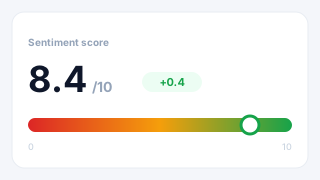
You know, people handling day-to-day, you know, get things, but management and people that can affect decision-making maybe don't have that same insight, and so things are lost in translation, and at the end of the day, that can translate to churn. So… This page is showing an example where, let's say, for example, a client comes to us, and they say, okay. I've got 20 account managers, I want a view of all of the companies that they work with. an understanding of how busy I am with each of those companies, and also, having some kind of sentiment score to understand who's happy, who's not, and having that in a way that I can really easily see it for the team, but then also for specific companies and for specific departments.
Now, a page like that solves this perfectly. The way that we work with AI to build a page like this is we would first, when working with you, understand, you know, the types of insights that you're looking to draw out. We would then train a model on Vertex AI, which is, you know, the model that we use. We would train the model to understand what a bad email looks like, basically, for your team, what a neutral email looks like, and what a positive email looks like. And then on that, we're able to give you a breakdown of how many fit into each of those categories.
You know, that can be for the whole team, that can be for specific companies. As you see here. And then we can also dig in and look at specific members of the department. Look at specific companies. Filter by sentiment as well, let's say I just want to see negative sentiment, and I want to see where that's distributed in terms of the companies. And then also at the bottom here, dig into individual emails, we can do that. You know, the main driving force behind this page is we want to be able to let you know when churn is coming before it does. A churn meaning, clients leaving.
So, yeah, this is what a page like this is built to attack, and that's the way that it might work. Now, also, as well as seeing, you know, per company and per employee. We also want to be able to give you the detail of the page. So, we would also give you email-by-email breakdowns of you know, what's negative, what's positive, and stuff like that. We would also give you a summary of those emails, too. So, with Email Meter, we're never going to display the, you know, the full email on the dashboard, you know, for security reasons, but what we would do is give you an AI insight into what the email said.
So, if I look at a specific company, and then I see all the raw emails. I can pretty easily see if there's recurring issues, you know, the types of things that are going wrong here. Yeah, it gives me a type of overview that, if I'm digging through emails one by one, it's going to be hard to get, but with a dashboard like this is, yeah, is much easier. Another way in which we can use these, these insights is, obviously, we can… we can break down that sentiment into what's good and what's bad. Let's say I have a slightly more different problem. Let's say that, you know, I have team members that are sending out emails that, you know, are not particularly, you know, not particularly warm in nature.
Or, you know, the tone of my emails is what's causing that issue in the first place. This is another thing that we can train, you know, AI to register. So if I do have someone that can be a bit, you know, robotic, for example, we have John here, who can be a bit cold or robotic. or, you know, team members that are being passive-aggressive, this is a far more difficult thing to know. I mean, again, let's say I'm the manager of a very small team, and I know what my team is like, maybe I'd know where to look. But especially for managers of larger teams, maybe who don't know people personally.
using this, you know, it doesn't have to be to tell people off, but just to train people on how to communicate with clients is really useful. So again, having a page that shows me more insights, you know, in one place, about the way in which my team is communicating with clients, and basically training them on how to do better. No. The next page I wanted to show you, is slightly different. What this page, handles is understanding the types of queries that our team is handling, and how we do deal with them. You know, let's say I've got a customer success team, and it's handling 20 different questions, but I don't know how busy I am with each of those questions, and I don't know how well I handle them.
Building a page like this can be super helpful, because it helps me to understand what I'm good at, what I'm bad at, and where training needs to go. So, if I see that I have, for example. this, you know, this, access to questions that I've only got 44%, sentiment score on. if that makes up for half the emails I'm responding to, that's a big issue. So how teams normally use this is understand what we're spending our time on, what we're good at, and then based on that, I can either train people to, you know, to… to do better at specific types of questions, but I can also create things, you know, create supporting materials.
If I know that half my day is taken up with one query type, I can automate responses based on that, build types of material to give to clients, basically make my team's lives easier so that we can respond to these questions better. Yeah. Again, the pages are completely customizable, you know, it doesn't have to be as it's seen now, so, you know, maybe there's a specific metric that you might like on a page like this, but… yeah, this is just an example of how this might work. Yeah, and we found it to be very useful with teams that we work with. Oh. Another page, which is slightly different, but is kind of on the same theme, is being able to flag critical emails and have them in one place.
You know, let's say, again, I work with a large team, we're working with various different clients. But I have no way of knowing, you know, what are the 5 things across all of my team that I need to make sure that I'm on top of. You know, if I have an account that is, you know, super important that if they leave, it's gonna cost us 30% of revenue, you know, this is something that we should be paying special attention to. Or let's say I have a type of question that a client is repeat asking, and if I don't respond this time, you know, it's in a contract we have that, that it will cost us a lot of money to, you know, to neglect.
It's completely up to you as to how we build this page, but the idea really is that we want to be able to give you a list of the top 5 things that you need to make sure the team gets back to, without having to trawl through various inboxes, and find them yourself. So, again. What goes into considering, you know, an escalation email or something that's critical is completely up to the way that you work, but… What we want to do is just give it to you in one place, so you can easily make decisions and easily make sure your team is getting back to things that, you know, could come around to bite you.
Yeah, so we have that there. And another thing to mention is we can send out alerts for pages like these. So let's say I've got an escalation center, and it's got the top 5 things that haven't been responded to. We can also give you a nudge to let you know when new things are coming in. So you don't even have to enter into the dashboard to know when there's something that needs your attention. We can be nudging you. And that can be via email. It could also be via the messaging board you use, whether that be Slack, or Teams messaging, or Google Meets. Yeah, just the case of having a conversation with us and explaining the way that you work.
And then we can, yeah, basically let you know how we plan on doing it for you. Now… The next thing that I wanted to talk to you about is… Building you some kind of page that prioritizes clients based on value. Now, this is something that we worked with a few clients on. And the way that we normally handle this is, well, first to explain what the worry might be. The worry here might be that I've got a load of experienced account managers, but I don't know who they're spending their time on. And I don't know how much the clients they're spending their time on are worth.
So, to make sure that the right people are getting the right amount of attention. Basically, being able to connect your CRM to a tool like Email Meter, so I can say, okay, these are the definitions we have in our CRM that break down clients by value. I want to be able to pull that into Email Meter and then filter for it on the dashboard, so I can easily see, right, these are our top 10 high-value accounts. you know, how long has it been since we last contacted them? And who is in charge of them. So for this, again, you know, I'm able to filter by the type of people on the dashboard, whether they be clients, partners, prospects.
Easily filter for the value of the account. So, you know, if I'm just interested in the big fish here, then I can filter for them. And then also, in this case, for this client, we also filtered by industry. You know, maybe there's some I, as a manager, need to be taken care of, and I want to just hop in and see, you know, who's there, then I can do that. But yeah, as you see on the left, the idea is to identify at-risk clients, maintain consistent touchpoints, and then prioritize based on value, and just really, yeah, relationship maintenance, I suppose, is a theme across all of these.
But yeah, this is the problem, and how we've solved it for clients in the past. Now, the, The last page, is, as I kind of briefly mentioned on the last slide, understanding where our team members are spending their time. So… as I said, if I've got a, you know, a large team, and I want to make sure that that team is spending the time on the people they should be, then I can have a page to do that. You know, it's pretty common we find that when clients come to us. People complain of being busy, and it's, you know, a lot of the time it's totally valid, but they might be busy with the wrong things.
And, you know, maybe, because obviously work arrives at your desk, and sometimes it's not really your choice on… on what you end up doing. It's as, you know, a manager, to make sure that I can redirect things, you know, funnel work to other people, if that's what's needed. You know, I just need to know what's happening. This is what a page like that might handle. And so on this page, what we've done is built a view that allows you to, you know, flick through specific team members. find out the amount of companies they're working with and their output, but also find out what their primary focus is, you know, where they're spending their time, and then see who they're spending their time on.
How many emails has this person sent to each different industry, each different type of account value, each different company? So I know that if I've got, you know, my number one account manager, and he's spending his time on some of our smallest clients, and they're not related to the speciality that he typically works with, then something's going wrong there. But, obviously, this is quite a niche thing to, you know, to try and find out via email, and especially with a larger group, is completely unmanageable. So yeah, a page like this would focus on that. Yeah, allow you to optimize and focus Based on role and seniority.
Make sure that you're balancing different types of task and client. And then track your performance against the stuff that you should be working on. Yeah, so these are some examples of the types of things that we've handled with AI. Just to, you know, to recap again. the model is completely trained on what you're looking to do, and so normally the process of working with us would be, kind of, you come to us with a type of issue, and we would then build a solution. You know, we're the experts when it comes to emails, so what we want to do is just hear, you know, what's causing you pain in your day-to-day life at work, and then us express it on a dashboard in the way that we think is best.
And all of these views, you know, can be set up differently to different roles as well. So, you know, if I've got. a top manager who just wants to see a quick one-pager and make sure everything's running smoothly, then we can have that. You know, minimal management with a bit more detail, so they can dig in and look at specific team members and understand what people are doing, then we can do that as well. Even down to having individual access for members of the team, you know, so I can… not just have this as kind of a, you know, a Big Brother-type tool. but also be able to log in and see my own progress, and not have these kinds of, you know, these kinds of insights come as a shock when they land at my desk.
You know, I can be the one that's in control of the way that I'm working. Yeah, so for today's webinar on my content, that was everything. Now, if anyone has any questions, yeah, we're more than happy to answer them. Just shoot them in the chat, and yeah, we can get back to them.
Mélanie Lelait: Perfect. Thanks a lot, Laurence. Yeah, just a quick reminder, you've got several features you can use to ask questions, so the Q&A, the way hand if you are on Zoom, and you've got both chat available on Zoom and on LinkedIn as well. So Laurence, I can see that you have a question. Can you tool analyze email in any other languages?
Laurence Edwards: Yeah, good question, good question, and yes, absolutely. So, just, I mean, first, just a case, like, like everything with us, just a case of coming to us and explaining the language that you want to analyze in. But yeah, speaking from experience, I can say that we've worked with clients in analyzing email content in, I believe, French, Portuguese, Spanish. Yeah, so just a case of coming to us, but yeah, I don't think there's, you know, particularly strict limitations on what we can process. Yeah. And as well, to mention, we, we actually, like, we're… I mean, we're split between the US and Spain, but we have lots of native Spanish speakers, and a French speaker, actually, who's helping me present the webinar today, so yeah, even down to support in other languages, you know, we're, we can be…
we can be flexible.
Mélanie Lelait: Yes, lovely. And how can I connect my CRM to Email Meter? So that's the second question that has been asked.
Laurence Edwards: Mmm, yeah, good question, good question. So, really, it's pretty flexible, the types of insights that we can pull out of CRMs or push back to them. It's just really anything with an API that we can connect to. So, you know, it doesn't have to just be a CRM, you know, whether it be HubSpot or Pipedrive, you know, we can obviously pull data from them, whether it be, as I mentioned in this last slide, you know, client worth data. or just the existence of contacts, or, you know, whatever it may be, we can pull it. Even down to internal ERP systems that you're using, you know, we do that for lots of clients as well, so…
just a case of talking and us understanding, you know, what you're using, and then we can kind of explain how we would connect. But it's all pretty straightforward. It's not very labor-intensive from your side.
Mélanie Lelait: Thank you. Michelle is asking, how do you validate the accuracy of AI Generate sentiment analysis across different industries?
Laurence Edwards: Mmm, good question. So, I mean, this is something that's down to our engineering team, really, and it would just be a case of them training the model as we go. So, I mean, we would obviously build and train the model to begin with, based on examples of, you know, your communications. So, you know, before we build the dashboard, we would ask for examples of different definitions, and then build the model based on that, train it based on that. And then, as you're using it, we will continue to train it, you know, on the data it's putting. So, I mean, from day one, it's pretty accurate, but, you know, we're fine-tuning that as you use it.
Yeah, so it's, it's, it's… It's pretty… it's pretty good, and it's getting better over time.
Mélanie Lelait: Perfect. Let us know if the answer provided by Laurence is enough, or if you need any follow-up, we'll be glad to go any deeper. And, what is the building time for a Nemon Meter dashboard?
Laurence Edwards: Yeah, good question. So, I mean, for the types of features that we covered today, you know, body processing and AI features, we typically see about a month to have a dashboard like this built. But that obviously includes us kind of going back and forth with you on examples. going back and forth as well on the way the dashboard would look, because, yeah, I mean, we're more like a productized consultancy, so it's really a case of us having the, you know, the pain explained to us, us then building what we believe a good solution would be to that pain, and then when you're happy, then we start building the dashboard.
So yeah, we normally say with the back and forth, and in that process, about a month to have you using it. Yeah, and then you'd be assigned an account manager, and they would work very closely with you to, you know, keep tweaking the dashboard, and… well, I mean, they're your point of contact for almost everything, you know, training your team members, making recommendations on on, you know, how to better pull data out the dashboard, and pages you could find useful, and how to use things on the dashboard, they're your go-to, really.
Mélanie Lelait: Perfect. I don't know if it's, all clear… If anyone… yeah, what's the biggest organizational change you've seen companies make after gaining visibility into this AI-generate insight? So this is the… the end, if we can say it like this, of the workshop, presented by Laurence. As mentioned in the introduction, we are having a fireside chat with two amazing CS leaders. So, really, the idea is just to… to go into a bit the… the challenge they face, the solution they've put in place, and maybe have a personalized conversation with, as well, some use case you are facing, so that we can have, like, an interesting conversation. So it would be amazing if you can, stay.
And yeah, so, basically, for the fireside chat, you… we… we've seen the presentation of Laurence going into what, AI is showing us in our email data, and now, really, the question is, what finally the team were missing before this AI existed, how they are using AI, so yeah, it will be those kind of conversations we will be having. So as mentioned, I have, two guests, who are here with us, so Sam Chandler and Michelle Guay. So, it will be amazing, if you can guys introduce yourself, so maybe we can start with Sam?
Sam Chandler: Hello, Melanie, I love the way you introduced me. Can you say my last name again? It's so much prettier when you say it.
Mélanie Lelait: With my French accent.
Sam Chandler: Yes, it's amazing, huh? Thank you, thank you for having me. I lead our scaled customer success motion at Customer. We're a CX software platform, and now moving into the AI space as well. So, these kinds of signals have just been my whole heart for the last decade, so I'm really excited that this these types of offerings are starting to hit the market and seeing all the amazing things that you all are doing. Also, congrats on the win. Very excited for you. Yeah, so happy to be here. Hopefully we'll make it worth your while to stay. I promise I will.
Mélanie Lelait: Thanks a lot, Sam. Michel?
Michelle Giray: Thank you, Melanie. Again, my name is Michelle. Actually, this is my first time joining this kind of webinar, and I actually enjoyed it. I'm a customer operations executive with more than 15 years of experience in leading customer operations, quality, and vendor governance. My work, has always centered on improving how organizations operate at scale, and lately. I've been particularly interested in how AI is transforming not just customer experience, but the way leaders make decisions. I'm excited to be part of this… today's conversation, actually. I joined a little early, and to exchange ideas with everyone here.
Mélanie Lelait: Thank you, Michelle. Lovely to have you both with us, and thank you so much for the exciting conversation we had on LinkedIn, and we will be having today. So let's go, directly into the topic. I know, Sam, you've been warning, organization and teams for years. that most of the teams are measuring the one thing, so you are talking about 40% of journal accounts were green, and just white before they left, so… Why is it… Still happening now in, in our today's, team and organization.
Sam Chandler: Yeah, yeah, so, I'm gonna start with a little story, because every time that I see a health… score that, is just so off, and, you know, customers are turning. It reminds me of this study that was done in 2013, where they took a group of radiologists, and they showed them scans, of, like, lungs to essentially find, like, unhealthy nodules. And in these test, images, they had hidden little pieces, like, little pictures of gorillas. into the images. And apparently, over 80% of These, radiologists, very intelligent radiologists, did not notice the gorillas at all, because they were so trained in on looking for these nodules that they completely missed the ridiculous gorillas in there.
And every time I see a health score these days, it reminds me of this study, because I'm a nerd. But basically, you know, I think part of the reason is that we're continuing to look for the signals that we know. And we can get completely distracted by that, and we miss the outside world. And so often, you know, think about all of the times that a churn had nothing to do with their product usage. Or maybe it did, but not in the way that we thought. And so, as I look at the progression of customer success throughout the years, even though you have this amazing tool in AI that allows you to see these signals so much more clearly, most CS teams that I see, they're still sticking with what they know.
And even within that. they don't go beyond the levels. So it's just the metric and not the measure. And to me, that's the prime example of where these health scores are going wrong. It's not just what happens within your product. But it's also what is happening to that customer at large. What's happening, you know, the larger economic forces. Are they about to get acquired? Have they just, you know, gotten a new person that doesn't like you? But even, like, beyond that. If you're looking at your internal metrics, you should also understand what is the measure of adoption. Most companies that I talk to, they have no idea.
They just know, oh, they bought 50 seats, they're utilizing 50 seats, they're healthy, and there's so much more nuance in that.
Mélanie Lelait: I love the, the, the introduction story. It set the tone, and yeah, you are completely right with, We've discussed on LinkedIn exactly this, so, yeah. I've seen that Michelle was approving as well. Do you want to mention anything else we… regarding what Sam was, saying? What I was actually jotting down while Sam was discussing her piece, I actually completely agree with that, Sam. Seat utilization tells you that people have access to the tool, but it doesn't tell you whether they're getting value from it.
Michelle Giray: In operations, we often make the mistake of measuring activity instead of outcomes. So, someone can log in every day, but they are actually using the features that solve their business problem. So, that's the question, and has that tool improved productivity? reduce handling time, or increased quality, or help them achieve their, you know, achieve their goal. So, that's where adoption becomes much more nuanced, I would say. I would look at the things like feature usage, workflow integration, user behavior over time, and whether adoption translates to measurable business outcomes. Those indicators provide a much better picture of customer health. Then simply counting active users. That's just…
Mélanie Lelait: Every thanks. Thanks, Misha, for the addition. Oh, sorry, Laurence. Go ahead.
Laurence Edwards: No, no, I was just gonna say, it's interesting, the types of problems that you've seen across different businesses and the way that people are monitoring. you know, success in terms of the products, like, is there a pattern? Are people typically looking at the same things? And when you recommend people to look at different things, like, are they similar normally, or is it a case-by-case for each company? Like, what has been your experience with this?
Sam Chandler: Yeah, you know, it's so interesting, because I feel like that there's a way to do customer success, and that's what… and Michelle, I am sure you have run into this as well, seeing the ops side of it. It's traditionally, you build relationships, and you see customers one-on-one, and if you are… if they're talking to you and they're smiling, then you're good. You, you know, you look at the renewal, you check it off, and that is that. And what's interesting is that I think with the ability to see so much more data. So many more signals. We should be evolving that, and we should be personalizing that.
I don't know how many companies are. I wish more companies would do that. Because we should be able to… personalize the signals we're looking at specifically to the either group or the company at hand. So, for example, you know, a few years back, before we had so much, you know, ability to see signals with AI, I had to do this manual work by hand, and I had to find the correlations by hand. So, most of, like, for example, in this particular program that I was building, I discovered that if you spent a certain amount of ARR, so it was, 10K in ARR, and if you had at least 100 tickets per month.
Those two things meant that you were gonna go far with this program. I don't know why. If I had AI, I would know why, but I wish I did. And so. I think that, you know, in this kind of, like, looking at just the same, you know, seat utilization and product signals, and just making sure it's there, we forget the fact that we can dig deeper, and we can say, what is it about this customer on this platform and using this product that was successful. Let's, like, investigate what they're doing, and find those correlations, and then build it back into our journeys so that everybody else can get that goodness as well.
Laurence Edwards: It's very interesting, yeah, thanks for the insight.
Sam Chandler: Thanks.
Mélanie Lelait: And that leads to the question I had as well for Michelle. With the AI that is surfacing, finally, this pattern, what's need to change in terms of operation, in terms of organization. for, finally, teams to be able to act on the signal that the AI is, giving us. And who has to be, responsible of reading those signals?
Michelle Giray: Yeah, I think the biggest shift is moving from insight ownership to action ownership. So, AI can surface, the pattern, but organizations Needs clear ownership on what happens… on what happens next. Too often, insights, sit with customer or analytics team, customer experience or analytics team, rather, but the people who can actually fix the issue are somewhere else. I would say it's there somewhere else. So, if AI shows that, Customers are struggling because of the product issue. or a process gap, or a policy decision, the right teams need to be involved, maybe conduct operations, engineering, finance, or workforce management. So, the operational change is creating, Closed-loop process.
Who owns the signal, who decides, and who takes action? So, AI gives us the visibility, but organizations that win will be the ones that build the structure and accountability to turn those insights into decisions and measurable improvements. That's all for me.
Mélanie Lelait: No, that's perfect, Michel. So, at the end, it's all about ownership and, who is taking this ownership. Sam, you agree as well with Michel on that, I'm sure.
Sam Chandler: I wholeheartedly agree, like, preach it, I'm printing this out, I'm framing it on my wall, Michelle, like, well said, beautiful.
Michelle Giray: Thank you.
Mélanie Lelait: And, Sam, yeah, go ahead, Leland.
Laurence Edwards: No, sorry. Yeah, sorry, no, no, just a small follow-up question for you, Michelle. Like, if these signals you find are kind of sitting, you know, with the relationships with, you know, with clients, like in email threads, or however they're communicating, like, do you think it's the fact that people aren't looking particularly, or do you think it's scale? Like, the, you know, the size of organizations and the fact that people aren't communicating to ask team members these things? Like, what do you think is the main issue there?
Michelle Giray: Thank you. So, I think it's a combination of both, Laurence. So, but I would say the bigger challenge is scale and signal overload. In a smaller organization, leaders are often enough to… I mean, sorry. So, in a… in a smaller organization, leaders are often close enough to customers that they can hear concerns directly. So, but as their company grows, those signals get more fragmented across teams, systems, and channels. That's where the challenge would normally show up. So, the information is usually there. Customer conversations, support tickets, surveys, usage data, but no single team has the complete picture. So, and when everyone owns a small piece of the customer journey, sometimes no one owns the full customer outcome.
That's when AI can… that's actually where AI can help. It's not about replacing those conversations, it's about connecting the signals that at scale and helping leaders see patterns clearly, and to make better decisions. And then the real opportunity is creating a culture where teams don't just collect feedback. They have the process and ownership to act on it.
Mélanie Lelait: I love y'all.
Laurence Edwards: Interesting.
Mélanie Lelait: You are making my life way easy to get this fireside, because…
Laurence Edwards: Understood.
Mélanie Lelait: the perfect, transition question for Sam. I know that you've built a lot of customer signal program, of course, and, yeah, what do you think will those AI signals, help the customer team achieve? So, I know that you've said that for the moment. you are not really working actively on AI, but what do you think in terms of your past experience and what you've seen as well? Would it help?
Sam Chandler: Yeah, well… I think that it will completely evolve the way that customer success works. It has to, because CROs, Chief Revenue Officers, will make it change. Right now, it feels like that, again, you know, we talked about the signals that they're kind of still stuck in this mode. The world that we're going into, the role of a CSM in driving value, driving outcomes, as Michelle's wonderful word. It will not be the… just the relationship piece. it will be, almost CSMs as, like, product managers. You know, they will be able to look at these signals, understand, you know, the correlations between them, and be able to interpret that value back to the customer.
In addition to just building the relationship. And, you know, AI has really kind of set a new floor for that, because, you know, it used to be, think about the old days, QBRs. That was what a CSM did. They delivered QBRs and, you know, they called it a day in the end. Now, a customer can go into any of their tools. Most of the time, your own product that you're selling them, and see those numbers. What they want from you is your expertise in understanding what those mean. And so, you know, we talk about what is our moat? What is our moat in this AI world?
You know, a lot of folks say it's data. Which, sure, if you can get a large enough data density to make that remote, but what I'm seeing a lot more is that Claude can build everything. Everything. The question should be, should it build everything? And so, what I see as the moat, especially as we think about the role of CS, is expertise. So, yes, you could build it with Claude, but you don't know the background of what you're building, or why you're asking it to do these things, and, you know, what will happen if you try to maintain that. Also, coupled with, you know, this new world of token maxing, as the kids say, but, you know, like.
How, as a CSM, can you guide your customers to building these workflows, either within your own product. or just in general, to maximize their budget without maxing out their token usage. So I think that that is how the smartest CSMs will evolve in this new world, and really provide value in that to their customers.
Laurence Edwards: this is a lot of what we are… I mean, it's more and more relevant at the moment, where, you know, there's tools, you know, it's… it's easy to go to a company and say, I want this, and then have it, but I don't know. Lots of the time, our job is understanding the… well, not understanding what people want, but understanding what the problem is, and then we are the ones to decide if what… if it needs to be… well, how to fix it, and if it's a good way to fix it, what they're recommending, basically, and not be drawn into the, you know, the want of, I feel like this is a solution, let's build it, but our job to understand and register, is that gonna, you know, what's the business need, what's the pain, and will will this actually help that?
Because if not, then it's useful, you know, it's useless, and… And, I mean, it's bad for us and also for you, so yeah, lots of our job is to understand what this translates to, and if it's what you actually want and need.
Sam Chandler: Absolutely, totally agree. And also, too, I will also mention that, like. before, I used to have to find these signals throughout email. You know, there's all of this metadata that we have available to us that we don't put into the equation, and I used to have to pick these things out and, like, find random ways to kind of, like. show the sentiment. Most recently, I went through our email inboxes, and I was like, what are customers asking us? And I discovered that, you know, 75% of it is just basic admin questions that we should be able to automate out and provide them the real value, but…
getting to that was super difficult. So, you know, in a tool like yours, ugh! If only I'd known before I did all that whole exercise, my life would have been easier.
Mélanie Lelait: Thank you, thank you so much, Sam. And, yeah, I've seen that the times fly, so I'm sorry I will have to cut the fireside chat. I don't know, Michelle, Sam, do you want to add like, one last thing about, AI, about AI-powered analytics, what we can, go deeper, maybe your last advice, that you have for sales leaders who are, listening to us.
Sam Chandler: Michelle, do you want to go first.
Michelle Giray: I'm actually still thinking.
Sam Chandler: Okay. How about I'll go what you think of it. Basically, like, my advice is always just don't let AI take the rates. One, to me, I don't think I will ever get to a point where I'll just be like, no, it's fine, go ahead and do whatever. But, you know, when you relinquish that control, you have no idea. you have no idea what it's gonna bring back, and, you know, your brain still needs to do that critical thinking. We still need that, and we still need to guide it. So my recommendation, don't let AI just run the show for you. Monitor it, let it lever…
use AI for all of the wonderful benefits of gathering these data points, finding these correlations, these things that used to take us forever, but don't fall into the AI slop trap.
Michelle Giray: Totally agree with that, Sam. So don't let AI take the reins. Let it strengthen your decision-making. So, I don't think, we'll ever get to the point where we should completely hand over the judgment to AI. No. The value comes from combining AI's ability to… identify patterns that scale with human experience, context, and critical thinking, just like what Sam had mentioned. And, AI can tell you what's happening and help you understand potential risks of opportunity, but leaders. still need to decide what action makes sense for the business and for the customer. So, the organizations, will succeed… that will succeed, are not the ones that will replace humans. with AI, human judgment with AI, rather, sorry. They're the ones that uses AI to help people make better decisions.
Mélanie Lelait: This is a perfect ending. Honestly, Sam and Michel, you are making my life way easier today. I don't need to conclude. Everything is here. No, thank you, thank you so much, Michel. Sam, thanks, so much, Laurence. for everything. And, yeah, I think we've got the conclusion. We need this visibility into the signal that AI is, is giving us, but we need to take ownership, and we need to take the expertise that we have, because we are the one, owning the account and, knowing exactly what, they need. Thank you, thank you so much for joining us. I hope you, you find, this conversation, interesting, and you, you have a lot of things to…
to test, in your own organization. If, you have any question regarding, Email Meter or something else, please don't hesitate to… to reach out to… to Laurence, and, I'm sure that Sam and Michel are, as well, super happy to… to answer any question you may, you may have. And, yeah, as I, said. this is really something that we are doing on a monthly basis. So, in September, we will be covering shared inbox. So, if it's something that you want to have more visibility into, we would love to have you. I will just put the, landing page to it, just right here. And yeah, we wish you an amazing summer, hoping it's not too hot, and yeah, looking forward to seeing you in September.
Laurence Edwards: Thanks for joining us, everyone. A pleasure.
Mélanie Lelait: Bye-bye, Sam. Bye, Michelle.