Customer risk hides in plain sight: in response times, email tone, and silence. See how to surface it before it turns into churn.
What you’ll learn
- The email signals that predict an unhappy client
- How to spot a relationship cooling off, weeks early
- What to do with a risk signal once you catch it
Want to see these signals in your own inbox?
Email Meter surfaces slowing response times, unanswered threads and cooling conversations before they turn into churn.
Request a demo →Prefer to read first? See our guide on the early warning signs hiding in your email data.
Transcript
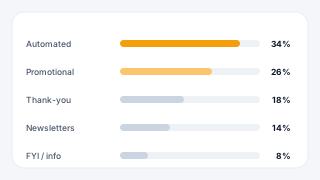
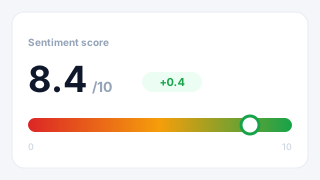
Ilmars Venskis: And that has allowed us to work with plenty of industries, which also kind of has, taught us a lot of… forced us, and also taught us a lot of different ways, how to make sure that customers are happy and stay with us, which… Protecting revenues is basically Making customers happy, and not making them to leave. And in this case, I started with the first example. which is probably familiar for every single business, scorecard. Because the scorecards allow us to very quickly see What is happening, and Even if, let's say, I come back from holidays, I want to open my scorecard and see, okay, do we have issues? What's going good? What's going bad? This is just one type of the scorecard. So, for example, here, you would have a Customers. Filtered by the revenue size, emails received, emails sent, SLA breaches, response time, last contact… when they are last contacted, and risk status. Now, what we can learn from here, for example, is, that even with our high-value customers, we still have quite few SLA breaches. But overall, the response time… response time is good. However, the issue here might be that when we have last contacted them. No. But a more… a better example would be Krusty Krab. Maybe it's not as high-value customer. However, even in this case. we can see the SLA breaches are… We're not doing well with SLAs, and response time is also… is significantly worse compared to some of the other clients. Which kind of almost allows us to predict. Unless we're gonna address this, there is an issue. Now, do you see, you might have a question, how do we get revenue size, do we do it manually? Of course, you can do it in spreadsheets manually, but also, for example, Imameter allows you to integrate CRMs, because CRMs have, you know, every company uses CRM differently, and typically there's some kind of values. So. you could use that. Now, risk status. This is a good question. How do you assess the risk status? And risk status could be, for example, the response time is not a… is significantly worse than, let's say. 4 hours, or 5 hours. This could be based on email content, if there's, AI features involved. Or this could be based also on a site breach, or some kind of other formula. I will speak of some of these topics, down the line. So… So this, this could be another thing, for example, very simple way, however, with email meter, you can. See, the spot daily issues would be just by looking when they have been last contacted. So, for example, here, we have some of the… Some of our customers. again, segmented by industry, by account value, but the most important thing here is days since the last contact. Again, depending on each industry, there might be, Not every client wants to be spoken with, or engaged with every month, or every week, or every quarter. But generally, there will be some kind of bar set. Or expectations. And, for example, I would not worry about Apple in this case, but I would definitely worry about somebody like ExxonMobil, because that is more than 6 months. Again, those who work already with email meter, you know that these kind of things can be set up based on your business and your requirements, just to give you an idea. Also, so, for example, here, we could also be able to filter by different value of clients, or even specific industries, because again, everything depends on industry. Another thing which we learn is sometimes And this is kind of an interesting case, is sometimes it's not even that into clients, but it's maybe account managers. Because… and even there's… there's always best practices, and there's personalities. So, for example, what we learn here? We created this as an example, so these are, let's say, our account managers. We can see that John Is sending a lot of emails. But he's clearly struggling with a couple things, such as his score for excellent service is quite low. Sometimes he sounds robotic and cold. I mean, in meantime, we have somebody like, candy. Sentiment significantly higher. Very low email volume. Excellent service number is very high, and she almost never sounds robotic. So, why is this? So, first question would be, how do we assess such thing as sentiment, or how well the emails are written. So, again, this is one of our AI features, which we can analyze incoming and outcoming emails. Again, specifically Created for each industry and each client, so it's not one size that fits all, which would allow us to monitor this. And, right now, it looks quite bad for a John. So… how do you protect your revenue? You could… you… there's always, coaching, because you can… or you can reassign. Maybe John is doing well with different customers, and struggling with some. Yeah, it really depends on industry, but in this case. We'll have a look another page at John. We'll come back to the drone, just keep that in mind. Actually, we are here. We, so this is one of the examples. First, we would understand who does John works with? Because again, let's say, if you would email me to… we have a… almost 200 clients, so we need multiple people, so each account manager, for example, has different accounts assigned, and we would like to see, okay, John. We know that you primarily… you can see that you primarily are interacting with the clients, but let's see where's your efforts going. So, in a page like this, you would be able to easily see, okay, he's been engaging with these specific clients, this is the amount of emails sent. And if you remember from the previous page, He does… he does… Sends a lot of emails, and we can see all here. Again, client distribution, if you wonder, this depends on… this is company-specific, because, for example, for us, we… we have a… Salespeople, they mainly interact with, potential clients, and then we have a customer success team, like me, who mainly engages with existing clients, and then there's some hybrid people. Again, this varies. Now, when I mention AI features and how this allows us to… how you could potentially assess risk status of a client to protect your revenues, is measuring sentiment. For example, here. Again? what you see here, you see a couple options, you know, analyze by employee, company, or sentiment. But generally, you would be greeted with something like this. You would see sentiment score, and then you would see sentiment per client. So, for example, we can see that sentiment is really high with, Holly. And… And then we have some E-Corp, it's not doing so well. Then you also have, for example, serious cybernetics, and so on. But again, you would wonder, I want to see also which emails are positive or negative, and those you would be easily able to see. You would be able to see positive emails, negative emails, and so on. Again, you don't even have to scroll, because you always have ability to select a specific employee, or even by company, or even by sentiment. Now, another thing that comes often that helps to maintain client happiness is prioritization. Because… Not… not all emails we receive are same, and this was… this kind of relates to… to the… to… to my question at the beginning. Let's say, on average, I forgot from the top of my head, but a person receives around 100 emails. Maybe about 50% of them require responses. But only 5 or 10% are really important. I call them make-it-or-break-it emails. And this is… this is an example how emails could be categorized. So, for example, this is actually… I borrowed it from one of our existing clients. You know. Work orders is important. But they already can see the team is doing a great job. Payments, also good. Well, I like getting paid. Insurance. Compliance, now it works. And now, we can immediately spot two, two, two areas. Because if the client cannot access the platform or service, Why would they stay? And we can immediately see that the two of the three categories with negative sentiment involve access and IT support. So this could be something, very simple, maybe I need to reset my password. Or I can't log in. But in the end is, it leads to the same thing. I'm unable to access the product that I'm paying for, I'm unhappy, and often it leads to customers wanting to leave. Again, and these issue types, again, this is based on one specific use case customer. Might be completely different for another type of industry. And again, typically, we work with our customers to establish those to make sure that we're analyzing the correct things. And last thing? Which kind of relates to my previous point, that only few emails are make-it-or-break-it email, are escalation emails. Because… Okay, this number here is particularly high. And these emails, the total amount of emails could involve many different things, such as, you know, thank you emails, reports. And all kinds of emails. But… potentially 5 emails from all the emails you received today are those that should be absolutely prioritized. This could be involving management, this could be… This could be, customers unable to access something. Again, depends per customer and industry. But this is small sample size, let's say… Here, company, client would be reporting that, They are unable to access a specific feature, something is not working. Which typically are those emails that should never be ignored, if you want to make sure that your customers are happy. And with ignoring, I'm not saying that somebody choose to ignore, but again, because of the volume of emails we all receive, we sometimes struggle to prioritize the right emails. And probably from everything that I've mentioned today. It is probably the most important, sort of, lesson, if you will. that… You need to help your employees to find the right things to focus on, because we all have a wide range of, Responsibilities, but email, Is one of those things that… that is very easy to… to… Disappear, or forget about it, and not because you forget about it, really, but because there's just too many. So, in email meter, we help our clients to also Really help to prioritize those emails the matter. And that is it for me. Does… Anyone has any questions?
Mélanie Lelait - Email Meter: Yes, thank you so much, Hermos, for the presentation. So just a kindly reminder to everyone that is here, you've got several options to, ask questions, so you've got the chat, you've got the Q&A, and you've got to raise your hand so we can unmute for you to speak. And a question just came in the chat, so, Irina is asking, is there a one-size-fits-all approach that works for everyone, or does it vary depending on the industry or even business unit?
Ilmars Venskis: That is a very good question. The truth is, it… there's no one-size-fits-all. That's why, if you look at the webinar today, there was a lot of different things, and it really varies per… per client, per industry, because even… even, email communications, email type of emails are received and sent really worries per client and per industry, and that's why we work with each client to ensure that we provide the data you really need. And that's why… that's why each dashboard is different, and that's why even features like AI is specifically designed for each client.
Mélanie Lelait - Email Meter: Perfect. Another question as well, in which scenario does traditional analytic perform best, and when do AI features provide the most value?
Ilmars Venskis: That's another great question. Now, typical analytics really are good at showing things like response times. how quickly we respond to clients. If there's, we often see that all customers have, like, SLA requirements in contracts with their customers, like, how quickly do you respond to each email? That's where… Not even traditional, that's… let's call it traditional analytics are super effective. Now, when it comes to AI, an AI feature, such as, like, email categorization. This is where to really understand what are we dealing with, because… let's say you have 10 employees and each receives 100 emails, it's impossible for somebody to even understand, okay, what kind of emails do we struggle with? Which emails we should prioritize, like escalations? Or, Or… is this email negative or positive? Should I involve my management? So… I… I strongly believe that they go… they work really well, hand-to-hand. Because, for example… for example, you'll see that, The overall response time is good. But what's about these emails that are… that should have been escalated? Should they be targeted differently? Probably, yes. So they would really work well, the… you know, response time for emails that have been escalated, for example, or even SLA targets.
Mélanie Lelait - Email Meter: Thank you so much, Elmaz, and maybe one more question? Are the AI feature customers able, or do they function the same way for every customers?
Ilmars Venskis: No, they, they, they, they, they work diff… they are absolutely customizable, and actually. they are… we… it's not like we switch on button and they work. This is something we learned very early, that each customer, and even the industry, is completely different. So, for example, he went… even… same industry can have different words that only the specific business and their customers will understand, and they might be… in one case, they might be positive, in my case, they might be negative. So. A very simple answer is, for each customer, we build is completely custom. To make sure that you really, get most out of email meters, so we really show you which emails, for example, will need to be escalated, which emails are positive, which emails are negative. how is the language used in emails, and so on. So, each case is unique.
Mélanie Lelait - Email Meter: Perfect, all clear. Thank you so much, Hermos. So if there are no more questions, we'll, we'll close today's session. So, thank you so much, everyone, for joining, and of course, thank you, Hermos, for sharing all this insight with us. So, this is part of our, webinar series, really designed to help you improve your, workflow. So, We'd love to see you next time, and if there are any questions, if you'd like to follow up on something that we've covered today, or maybe another topic, you can directly reach out to Hilma, so we have added his contact detail in the chat. Thank you, everyone, have a wonderful day, and hope to see you next time. Bye-bye!