Quick Answer
What is email response time tracking?
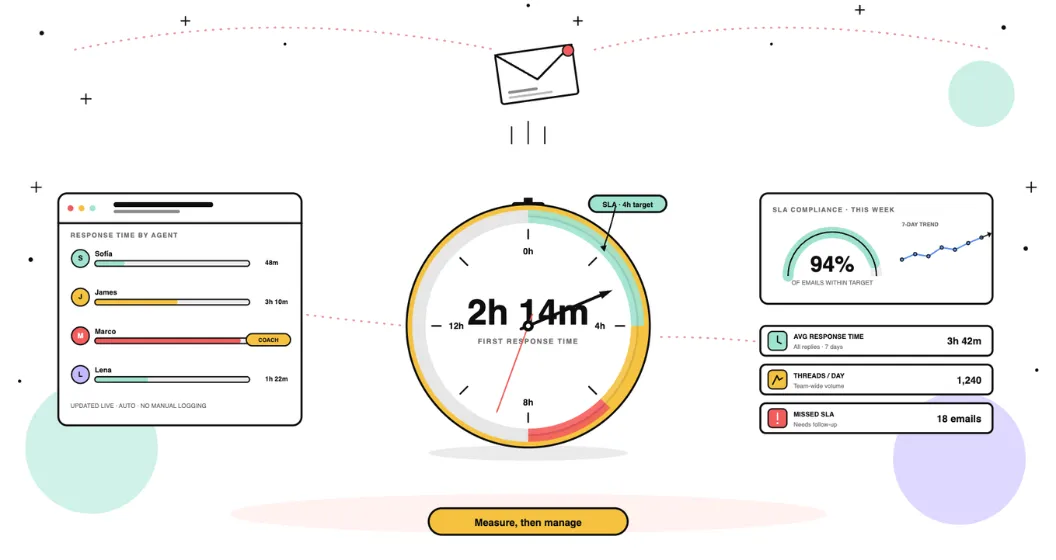
Email response time tracking is the automatic measurement of how long it takes your team to reply to emails, from the moment a message arrives to the moment a response is sent. It covers four core metrics: first response time (how quickly the first reply goes out on a new thread), average response time (across all replies in all threads, over a given period), response time by agent (broken down individually, so you can see who is fast and who is struggling), and SLA compliance rate (the percentage of emails answered within your defined target). It is different from email open tracking or read receipts, those measure what recipients do with emails you send. Response time tracking measures how your team handles the emails they receive.
Most teams have a rough sense of how quickly they respond to emails. They think they are doing fine until a client complains, a lead goes cold, or an SLA review reveals that the average they were proud of was hiding a handful of agents consistently taking two days to reply.
Email response time tracking removes the guesswork. It measures automatically, by agent and by client, what is actually happening in your team's inbox and gives managers the data they need to act before the problems become visible to customers.
Here is everything you need to know to get started.
Why email response time tracking matters
Most teams assume they are responding faster than they actually are.
The average company takes 12 hours and 10 minutes to reply to a customer email, according to SuperOffice's Customer Service Benchmark Report, which sent the same support request to 1,000 companies. The best performers in that study averaged three hours.
Speed is not a soft concern. Harvard Business Review's study of online sales leads found that firms contacting a prospect within an hour were nearly seven times more likely to qualify that lead than firms that waited just one hour longer, and sixty times more likely than those that waited a day or more.
The problem is not effort. It is measurement. Without tracking, no one knows:
- Which team members are consistently slow to respond
- Which clients are waiting longer than others
- Whether the team is meeting SLA commitments or quietly missing them
Tracking closes that gap. It does not require anyone to log anything manually, it runs in the background, measures every reply, and surfaces the data managers need to act.
The four metrics that matter
First response time
The time between a new email arriving and your team sending the first reply. This is the metric most clients notice, and the one most directly tied to satisfaction and conversion in customer-facing roles. For sales teams, first response time to inbound leads is the single most important email metric to track.
Average response time
The average across all replies sent in a given period, not just first replies. Useful for understanding overall team pace, but can mask problems if a few fast replies pull the average down. Always read alongside first response time.
Response time by agent
Where aggregate metrics hide problems, individual breakdowns surface them. A team average of six hours might mean one agent is consistently responding in 30 minutes while another takes 18 hours. Response time by agent is what makes coaching conversations possible and workload rebalancing decisions defensible.
SLA compliance rate
If your team has committed to a response time target, four hours, 24 hours, whatever the standard is for your context, SLA compliance rate tells you what percentage of emails actually met that target. This is the metric that connects email performance to client contracts and service agreements.
For a deeper look at what good looks like across different team types and industries, see our guide on industry standard SLA response times.
How to track email response time in Gmail
Gmail does not track response times natively. You can get a rough picture by sorting sent mail by thread and manually comparing timestamps, but this breaks down immediately at any meaningful scale.
The practical approach is to connect a dedicated analytics tool. Email Meter integrates directly with Gmail via Google Workspace, begins measuring response times automatically once connected, and provides all four metrics above broken down by agent and time period. No manual input required.
For a step-by-step walkthrough of what Gmail tracking looks like in practice, see our guide on Gmail analytics and email performance monitoring.
How to track email response time in Outlook
Outlook has no native response time tracking either. Microsoft Viva Insights provides some email habit data for individuals, but it does not give managers team-level visibility or SLA compliance data.
Email Meter also integrates with Outlook via Microsoft 365, with the same automatic tracking and team-level dashboards available for Gmail users.
For a full comparison of Outlook tracking options, see our guide on email tracking for Outlook.
Can Gmail or Outlook track response time natively?
No. Neither platform reports how long your team takes to reply.
Google Workspace admin reports cover volume and usage: how many messages were sent and received, storage consumed, security events. None of it measures the gap between an incoming message and its reply.
Microsoft Viva Insights comes closest, but it is built around individual work patterns rather than team reporting. It surfaces habits like time spent in email and after-hours activity for the signed-in user. It will not give a manager first response time on a shared mailbox, a per-agent breakdown, or SLA compliance, and it depends on the licence in place.
This is the gap every growing team runs into. Both platforms hold the timestamps, neither turns them into a response time metric, which is why tracking has to happen in a layer on top of the mailbox.
Setting a response time target before you track
Tracking without a target tells you what is happening but not whether it is good or bad. Before you start measuring, define what acceptable looks like for your team.
A few reference points by context:
| Team type | Recommended target |
|---|---|
| Customer support | Under 4 hours (ideally under 1 hour) |
| Sales, inbound leads | Under 5 minutes for first response |
| B2B client communications | Under 24 hours |
| Internal communications | Same business day |
These are starting points. What matters more than hitting an industry benchmark is consistency, a team that always responds within six hours is more trustworthy to clients than one that sometimes replies in 20 minutes and sometimes in two days.
For guidance on building a formal policy around these targets, see our guide on email response time policy standards.
For a full breakdown of benchmarks by team type and industry, see our email response time benchmarks guide.
If you are comparing tools, see our roundup of the best best email response time tracking tools.
What makes email response time hard to track
Most teams do not struggle because they lack a tool. They struggle because email itself resists measurement. These are the six obstacles that break the number.
1. Unanswered emails have no response time at all
An email that never got a reply produces no data point, so it vanishes from the average. A team that answers 80 emails quickly and ignores 20 looks faster than a team that answers all 100 at a steady pace. The average flatters the worst behaviour. You have to count unreplied emails alongside response time, or the metric lies.
2. Clock time is not working time
An email that arrives at 6pm on Friday and is answered at 9am on Monday shows a 63 hour response time. In working hours it was answered almost immediately. Without business hours applied, every evening, weekend and public holiday inflates the number, and teams in different time zones stop being comparable.
3. Shared mailboxes hide who actually replied
When a team answers from a shared address, the mailbox is the sender, not the person. Response time can be measured for the mailbox as a whole but not per agent, so you cannot see who is carrying the load or who is falling behind. This is the most common reason per agent accountability breaks. See how to monitor a shared mailbox.
4. Not every reply is a real reply
Auto responders, out of office messages, internal forwards and one line acknowledgements all register as replies. Each one stops the clock and makes the team look fast while the customer is still waiting. Unless <a href="https://www.emailmeter.com/blog/automated-email-response-examples/">automated messages</a> are excluded, first response time measures your autoresponder, not your team.
5. Averages hide the customers who waited
A handful of threads left for days drags the mean far above the typical experience, while the median hides that tail entirely. Neither number on its own tells you how many customers waited too long, which is why SLA compliance rate matters more than any single average.
6. Manual tracking goes stale within weeks
Neither Gmail nor Outlook reports response time natively, so teams fall back on spreadsheets and manual sampling. It works for one review, then nobody updates it. The measurement stops exactly when the team gets busy, which is when it matters most.
How Email Meter tracks email response time automatically
Once connected to Gmail or Outlook, Email Meter measures every email exchange without any setup beyond the initial connection. The dashboard shows:
- Average first response time and average response time for the team
- Response time broken down by individual agent
- SLA compliance rate against whatever target you set
- Which specific emails missed the target, who sent them, and how long they waited
Reports can be scheduled to arrive automatically, daily, weekly, or before specific meetings, so managers do not have to remember to pull the data.
Tracking response times by hand stops scaling the moment your inbox gets busy. See every reply time, SLA breach and per-agent load automatically: Start a free 14-day trial → | Request a demo →
Frequently Asked Questions
What is the difference between email response time tracking and email open tracking?
Email open tracking measures whether the recipient opened an email you sent. Response time tracking measures how quickly your team replies to emails they receive. They solve different problems: open tracking is used in sales outreach to gauge recipient interest; response time tracking is used to manage team performance and SLA compliance.
Can I track email response time without installing software?
Not reliably. Gmail and Outlook do not track response times natively. Manual tracking, comparing timestamps in sent mail, breaks down at any meaningful scale and does not give you agent-level breakdowns or SLA compliance data. A dedicated tool like Email Meter automates this entirely.
Does email response time tracking require employees to log or tag emails?
No. Email Meter measures response times automatically from timestamps, no manual input, no tagging, no change to how the team works.
What is a good average email response time?
It depends on the context. For customer support, under four hours is a common standard, with under one hour for high-priority tickets. For inbound sales leads, under five minutes dramatically increases conversion rates. For general B2B communication, under 24 hours is the baseline expectation. See our full benchmarks guide for breakdowns by industry and team type.
How is response time tracking different from SLA management?
Response time tracking measures what is actually happening. SLA management sets targets for what should happen and measures compliance against those targets. Response time tracking is the foundation, you cannot manage SLAs without first measuring response times accurately.
Why is it so hard to track team email response time?
Because email resists measurement in six specific ways. Unanswered emails produce no response time and quietly disappear from the average. Raw clock time counts nights and weekends unless business hours are applied. Shared mailboxes hide which person actually replied. Auto responders and internal forwards register as genuine replies and stop the clock early. Averages hide the customers who waited longest. And manual spreadsheet tracking goes stale within weeks, because neither Gmail nor Outlook reports response time natively.
How do I track email response time in Outlook?
Outlook has no built-in response time report. You can open a message's properties to read the exact sent and received timestamps and subtract them by hand, which works for a spot check but not for a team. Microsoft Viva Insights shows individual email habits under some licences, but not team first response time or SLA compliance. For ongoing reporting, connect an analytics tool to Microsoft 365 so response times are calculated automatically across the whole team.
How do you calculate average email response time?
Take every email your team received in a period, find the time of the first genuine reply to each one, and average those gaps. Two decisions change the result significantly: whether you count clock time or business hours, and whether you exclude auto-replies, out-of-office messages and internal forwards, which stop the clock without answering anything. Emails that never received a reply produce no data point at all, so they should be reported separately rather than quietly dropped from the average.
Can you track response time in a shared mailbox?
Yes, but not with the mailbox alone. When a team replies from a shared address, the mailbox is recorded as the sender, so neither Gmail nor Outlook can tell you which person actually answered. Measuring per-agent response time in a shared inbox requires a tool that reads the underlying account activity rather than the From field.
What is the best email response time tracking software for teams?
It depends on where your team already works. If you are on Gmail or Microsoft 365 and want reporting without changing how people handle email, an analytics layer such as Email Meter connects to the existing mailbox and measures automatically. If you would rather replace the inbox itself, shared inbox products like Front and Hiver combine handling and reporting in one place. Helpdesks such as Zendesk report response time well, but only for conversations that become tickets. Whichever you compare, check three things: whether it applies business hours, whether it resolves who replied in a shared mailbox, and whether it breaks results down per agent.