How do customer-facing teams stop reacting and start anticipating? A practical walkthrough of how teams use Email Meter day to day, with real results from Fujifilm.
What you’ll learn
- Where time quietly leaks in your team email workflow
- The reports teams check every week to stay on top
- How Fujifilm turned email data into fewer after-hours emails
Want these numbers for your own team?
Email Meter reports real response times, reply volumes and workload distribution across every mailbox, including shared ones.
Request a demo →Prefer to read first? See our guide on how to measure your team's email response time.
Transcript
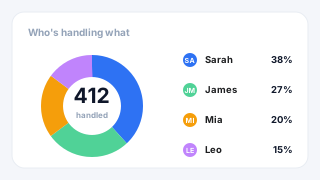
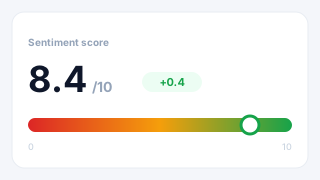
Laurence Edwards: Unlike a CRM, or a system where you need to change your workflows and run your email through it to get insights, really we pride ourselves on being flexible and working around the way that you work, so that we can give you the insights you need without disrupting the way that you work. So what we're gonna run through today is a few different use cases that we've encountered with clients in the past, you know, things we've built for them. But the thing to bear in mind is we're a productized consultancy. So what we do is we tailor pages for you. So all the things that we see today, are gonna be stuff that you can change, play around with, you know, we want something that fits you exactly, so you can make the decisions you need, without having to change the way you do things. An example of someone that we've worked with in the past, is Fujifil. We work with… with Fujifilm, and they came to us because they were experiencing issues with workload distribution amongst their team, and they thought that that was affecting customer relationships. You know, poor response times because people were overwhelmed, but they didn't really have a way to, you know, see what was going on, and see the kinds of problems that that was creating. So, yeah, we began working with them. And yeah, they pretty quickly saw that the response times weren't what they wanted them to be, and that some people were getting more work than others. And so we built a dashboard that addressed that. We actually have a customer story about that on our website, that you can see, that my colleague will post in the chat. But yeah, we pretty quickly saw that their response times were reduced to 10 or 11%, I think, initially. That was about 4 years ago, 5 years ago, and we've been working with them since, and, you know, continue to improve. And they've not had to change the way they do things and interrupt their service to their clients, so… This is an example of the way that we work, and I'm going to run through today a few, different ways in which that we do things to see, you know, how we can help you. So, let me share my screen. And I can run you through. some stuff. So, yeah, this is an example of the service level agreement page, the response time page. So… difficult to know where problems are happening in terms of response times. You know, it's it's easy to know if people are, you know, unhappy with the level of service you're providing, but if you work in a big team, you know, it's sometimes not easy to know where you're dropping the ball. A page like this handles that perfectly. This is just a really simple way to view response times for your team. What it allows you to do is set response time goals. And then, you know, for team members, or, you know, departments, you know, whole departments, or members of shared inboxes, we can have a graph like this that just tells you, right. based on the goals that I want to achieve, how well am I achieving them? So I can see here that we set these buckets at the top, up to 12 hours. between 12 and 24 hours, above 24, and it's just telling me, for each of my team members, how well are we completing this goal? You know, green, good, red, bad. It's very easy to see where things are going wrong. As well, so let's say Dwight here. I see that Dwight has missed 4 emails within our goal. We can select this bucket, I can go down, and I can see when the email came in, who it came from, you know, what the question was, importantly. And how long it took to get a response. So… If we are taking too long to respond to things, it's really easy to pinpoint and say, okay, this is the member of my team that needs a bit more training or encouragement, and these are the clients that are being affected. You know, really, we want to highlight who's experiencing these response times so that you don't suffer the churn that it might cause. Yep, so this is a response time page, and as well, it's subject to all the filters at the top here, so… Right now, everything's being considered, but if I'm just interested in, you know, a specific day, week, month, I can select this at the top. If I want to get rid of, for example, domains that I'm not interested in, maybe I'm not interested in internal emails for this chart, maybe I'm not interested in automated emails, you know, even down to the folders, or categories, or labels that we're using. You know, we can be really specific about the stuff that we're using to get rid of any noise, anything that, you know, you're not interested in seeing. On, on, on these pages. Now, the next thing I wanted to show you is… similar to what I mentioned with our Fujifilm case, is workload distribution, you know? It's… easy to know, you know, if the team says they're overwhelmed, that, you know, what traffic looks like, but it's kind of hard to see what the increase looks like, and how busy people are, and when. So, teams commonly use this workload distribution page, to anticipate shift patterns, especially in generic addresses, like the sales address, the customer success address. With a page like this, you know, you can expand the date range and look at, you know, for example, the last 6 months, the last year, and really easily see what these patterns look like of busyness. So if I know, for example, my team says they're overwhelmed with emails and they're in too many meetings, for example, they're getting dragged into. and I see that on Mondays, 3 till 6 is, you know, hell for them, then I can, you know, I can make sure to block out their calendar, do things to anticipate this type of traffic, and make their lives easier. So yeah, we've got this page. And… Also, for just seeing periods of traffic throughout the year. this page is telling us traffic, you know, day by day, month by month, and we can actually expand the date range here to look at historic data. So, you know, we give you, as standard, two years of historic data with Email Meter, you know, two years before you began using the tool. So, you can really easily, you know, go back and see how things have changed over the last couple of years. you know, if you want to go back further, you can as well. I think we have up to 5 years historic data. But yeah, you can basically go and see what trends look like throughout different periods, and anticipate workload. Yeah, so you've got access to all of that as well. No. Going back, another thing that people, I mean, people are asking about more and more these days, is which capabilities we have when it comes to AI. Now. If I go down here… We can do a whole host of things with AI. So, a really common use case is that people are unsure of, number one, the types of questions they're spending their time on. You know, if I've got a customer success team, and they're handling a load of different things. you know, maybe the training is the same, like, you know, for all the different queries that they have, you know, they get the same amount. But most of our questions relate to one topic. You know, really, you want to be able to train people on that topic, automate certain things, maybe have, you know, materials they can draw for. Just to make everyone's life easier. We can train the model to understand the types of questions the team are getting, you know, how much… how many of those questions we're getting, you know, throughout the week, and even the sentiment for those. You know, we can change the model to understand what a good response looks like, a medium response, a bad response. So I can see, you know, number one. you know, how busy I am with certain things, but number two, how good my team is at handling them. You know. as I said, just an example, but yeah, a way in which lots of our clients are using this AI feature. So, you know, if I'm concerned about customer relations, I can select a topic. go down, and I can see all of the emails that we have sent and received. For that. And I can see a brief summary here as well, explaining, you know, what the email's about, and giving me an insight into why it was positive. We're never going to display, you know, for security reasons, the content of the email here, but you can have a summary so that you can, you know, get an understanding of what happened without compromising your security. No. Another thing that people pretty commonly want when it comes to body processing and AI is just a breakdown of how happy their clients are, basically. So, what we can do here is, give you a… basically, if you give us a list of all the clients you're working with, then we can make a chart here which breaks down each of those clients by their sentiment score. So I can just have a really easy list that says, right, happiest. to least happy. I mean, I guess this is just to keep your clients happy, and in turn, anticipate churn. You know, everyone gets feedback from their clients, and I'm sure we use that, but having it in one place is difficult, and, you know, it's hard to compile a lot of that information, you know, without doing something manually. So yeah, a page like this is really useful, and it gives us the option to, you know, if I'm concerned about Tyrrell. then I can click in, see what they're asking us about. And see, you know, what's going on. Why they're unhappy, and then hopefully try and solve it before it turns into lost revenue. Yeah, now, another thing… that is a really common pain point of clients of ours, is that they're using generic addresses. Like I mentioned earlier, you know, we can provide insight on those. It's very difficult without using, you know, switching to some kind of pretty labor… you know, switching to Zendesk or some kind of ticketing system to understand, you know, how the team works, and… And who's overloaded, basically, in these inboxes. So, we, you know, without having you do anything extra, we can tell you Who is doing what inside of these inboxes, how long it's taking them. So, you know, if you've got one person pulling the weight inside of the inbox and another two doing not a lot, then it's pretty easy to see that. So a page like this will list all of the generic inboxes that we have. So we've got sales and HR here. I'm gonna select sales. And it just really easily breaks down how many emails each person sent from the inbox within that time frame. And what percentage of the work that translates to. So, yeah. pretty commonly, clients of ours, you know, maybe they've got an inkling, but it's hard to, you know, really, really pinpoint that, but yeah, a page like this makes it impossible to ignore. Yeah, and if I select, you know, Jim, for example, I can go down and see all the emails that he's responded to in there. So yeah, I can see all the questions he's answered, how quickly he's doing them, and when he's doing them. So yeah, a really comprehensive breakdown of who has been doing what inside of that inbox. Now, something else I wanted to mention, just to be wary of time. all of the reports that we're looking at here can be automated. So, you know. as a part of working with us at Email Meter, you would be assigned an account manager, and that person's job really is just to, you know. be your, you know, your person to… to come to with anything at Email Meter, so whether that be training for the team. whether that be, you know, recommended customizations for your dashboard, they're an expert, and, you know, they're handling, you know, a big group of clients and seeing what works best for other people, workflows that work best, you know, tweaks to pages that offer more value. So, yeah, we… We can offer that for you. And part of that will be setting up automated reports. So if you know that you have a meeting, you know, sales meeting, 9am on a Monday, that we can automate the response time report, the shared inbox report, the sentiment report. So that instead of having to go in and check every Monday morning, you have this waiting for you on your desk. We really want to make the experience with Email Meter as easy as possible, and yeah, that person's there to help you configure all those things. And, one more to that is… that we also have an alerting system for response time. So, it's great to know. you know, when things have been missed, and look back, and analyze, and learn. However, it's also nice to have a little reminder and a nudge to tell me, okay, for this client that, you know, is our biggest client. that we're about to miss a response time goal, and it's gonna cost us a lot of money. So, yeah, it's it's there to nudge you, help you. That can be via email, or it can also be via Slack, can integrate with Slack. Yeah, so just a case of finding out what you want the nudge to be about, whether that be response times, whether that be you've not touched a client in 30 days, 60 days, 90 days, you know, that's another common use case for customer success. We're there to help. Yeah, and to be wary of the time, just so we can make sure we have time for questions, I'm gonna round it up, and we can, yeah, we can go across and answer any questions that we have.
Melanie Lelait - Email Meter: Thank you, Lawrence. Actually, we've got, one question, can we configure Workflow 2?
Laurence Edwards: Yeah, so, really good question. when you… sorry, when you say configure workflow, could you give me a little bit insight, a little bit more insight as to what you mean by that, sorry. As in, do you mean within the dashboard, or do you mean, kind of. You know, changing, changing things within your own email usage. Okay, I see, you mean automated responses. So, when it comes to automating responses, I would say we're more of a visibility company, really. So, as opposed to, kind of, being the people to, you know, to create content and to automate things within your own inbox. what we aim to do, really, is to give you the insight to make decisions based on that. So, as opposed to sending the emails for you and giving you the templates, what we might do is tell you that, you know, you see that of that 100 emails you receive a day, 55 of them are relating to this query. So, that's, you know, telling you that you should automate some stuff relating to this query. So we're not actually doing the automation for you, but, you know, we want you to have the information to make the decision to automate that, if that makes sense. Okay, so I do see there is one more question there. So, I see that you're saying that you use a CRM for client information, and can you use this data within Email Meter? Yeah, very good question, and yeah, absolutely you can. So, Email Meter, you can integrate with basically anything with an API. Anything we can draw data from and feed it into Email Meter, we can… we can, you know, enrich your Email Meter dashboard with that information. So, I mean, a few examples as to how you can use this. Let's say you use HubSpot, and you have all of your contact information in HubSpot, you know, defining who are clients, who are leads, who are, you know, people in different regions, or different payment brackets, or whatever that is. So, you can easily filter for that on the dashboard. we can connect to HubSpot via API, automate, you know, a data import from From there, and then it means that on the filters and the dashboard, you know, if I… if I go back to the main dashboard here. As a part of all of the filters at the top that, you know, that we had there, we can make a filter for, you know, client value, or for, you know, the type of, you know, the payment bracket they're in, or whoever. So, yeah, if I'm looking at response times, and I'm only really concerned about my highest paying clients, let's say, I'm sure you're not, but let's, let's make that suggestion, yeah, then you can filter for it easily. So, yeah, you can, and it's just a case of coming to us, and us looking at what the integration might look like. And it can be not just for CRMs, it can be for ERPs, systems you're using internally. Whatever your source of truth is, if there's a way to connect via API, then yeah, absolutely, we can do it. Great, and any more questions? Let's have a look. So… And what is the building time for a dashboard like for this? I would say that it kind of varies, because as I said, you know, we're a productized consultancy, so we really work with lots of people doing lots of different things. For the features that we ran through today, aside from the body processing ones, where we're training, you know, training a model in Vertex AI, typically we say, you know, a working week to have the dashboard built and with you. If it's something, you know, custom that we have to go in back and forth a little bit and build mockups for you and arrive to, you know, a final design you're happy with, a bit longer, maybe a couple of weeks. And then anything body processing related, we say normally, about a month to have that built. Yeah, but inside of that month will be us asking you for examples of, you know, emails that fit into the different categories that… that you want to define. Really, we want to have it so that when you start using it, it's already used to processing data that, you know, it's been trained on your data, basically, as opposed to generic, just so it's as accurate as possible. So yeah, all of that's involved in the month, but it's just, yeah, it's that length, just so we can have it. You know, as tweaked as possible, and the best experience for you when you begin using it. Great, so a couple more questions. Can email me to be used by small-scale startups? Yeah, absolutely. Yeah, absolutely. We've got a really broad variety of clients that we work with. It's not just by larger clients, we work with, you know, much smaller companies. We, you know, we work with everyone, basically. Yeah, so, yeah, there's no, there's no limitation there. And another question I see here, how easy is it to customize the dashboards, and can it be customized by me? Yeah, very nice question. So… In terms of customization, there's a few things that can be changed by you. For example, we have the, you know, the enterprise portal here, which allows you to make managerial changes, like adding and removing people from the dashboard. you know, changing the level of access that team members have. So, you know, I can limit who sees what, basically, and the level of access they have to the dashboard. I can also limit when we're taking into account response times, like the business hours of the company. as well as the kinds of information that we are showing in the dashboard, I can exclude, you know, specific addresses, emails with certain words in the subject line, Even defining contact groups. Like, grouping people, you know, based on their domain. You know, so if I want to have clients in tiers, or region, or whatever, yeah, all of this stuff can be done by view. However, when it comes to changing the actual layout of the dashboard and building new pages, it's just something that would have to come to our team. Now, this would be very quick and painless, I promise. As I said, you'd be given an account manager. And they're there to, like, service your account, and they're very responsive. So, yeah, you can anytime book a meeting with them, or just shoot them an email outlining what you want to do, and they'll quickly come back to you and say, okay, this is… you know, what it would take to build this, and how long it would take, and then, yeah, when you give us the go-ahead, we'll make it. But it's, yeah, it's very quick and quick and easy, especially if it's just reordering a pre-existing page, it's, yeah, it'd just be a case of us going to the engineering team, and we're a tight-knit company, so yeah, everything runs very smoothly there. Great, so I see another question here. Is sentiment mining possible with Email Meter? To confirm, when you say sentiment mining, do you mean just breaking down, like, the sentiment of emails and understanding the tone of emails? Is that what you're asking, or do you mean something more specific by sentiment mining? Yeah. Nice, absolutely. So yeah, that is possible, for sure. That's one of the main… well, one of the most common use cases of the body processing feature. And it's not just done by keywords, it's done by a model that we train to understand the tone of the emails. So… If I go down here… Yeah, and as I mentioned, the layout of this page is really up to you. You know, this is just an example of… An example of how we've broken it down for people in the past, you know. by client, so I can easily see a kind of client health based on the sentiment of all of their emails compiled and added in a score as a percentage. Yeah, so we can absolutely do it, and it's really up to you as to how you want to display this information. But yeah, we can do it, and the model will be trained specifically for you. So if there's kinds of language that, you know. a normal to an account, a normal to, you know, maybe your region even, then the model's gonna learn, gonna learn that, and then express it that way. So, yeah, it's… A very tailored experience. Right, so any, any other questions? We, yeah, we've got a few more minutes before the fireside chat, so yeah, anything… Anything I can answer, I'm more than happy to do that. Great. Okay, so, what we're gonna do is we are gonna be hopping to the Fireside chat, I believe, so I'm gonna let Melanie take over and explain what the next steps are. Thank you all for listening.
Melanie Lelait - Email Meter: You've got maybe a last question, if we have time?
Laurence Edwards: Oh, great, thank you for the reminder, Melanie. So… Do we get the option of getting some test logins to check the actual working data? No, no, absolutely, no problem, no problem, you're not too late. So, the way that it works, typically, is we don't offer… so, we have a few different product plans, basically, but with the Enterprise, well, the custom plan, sorry, that we have been looking at today, what we do is a monthly rolling subscription. So, you're not locked into an annual contract or anything like that. You've got the opportunity to pay for a month. You know, if you… if you decide it's not for you, then you can cancel, and, you know, you're not locked into any kind of fixed term. So, yeah. I mean, this is what the option is when it comes to testing out the plan. We… yeah, and once you're happy with that, we offer discounts for annual payments, so you can try a month. Pay the rate, and then if you decide that you want to move forward after that, then… You can take the annual option and make use of the discount. But yeah, that's more or less how that works.
Melanie Lelait - Email Meter: Perfect. And yeah, now I think we can, go ahead and close the session, the live session of the presentation that Lawrence did. So, thank you so much for the question, for your engagement, and, thank you, thank you to Lawrence for sharing everything with us. So, if you have questions and want to chat further, so please stay. We've got, as I said, in two amazing guests joining us. And, yeah, the idea is really to talk about the challenge we are all navigating, and to see which are the best solutions that we can cover. And, you can as well, if you've got any question on email to me, you can as well contact directly Lawrence. So we have put his email address directly in the chat. And yeah, let's go for the Firestorm chat. So, as, Lowens discussed, basically, we showed, how email data reveals what's actually happening. In your company, inside your team. So now, really, the idea is to, to hear from our guests, because visibility is one thing, but what we can do with it is another. So, we've got different, speaker joining us today with different, angles, and who experience different challenge, and, yeah, I, I'm really excited to, to start the conversation today. So we've got Nihaj, Justin. Victoria and Liron, thank you so much for being here today with us. Maybe we can start with, Nihaj. So we discussed a bit on LinkedIn, regarding, like, that the weird, issue residing, underneath repeat contact, internal friction, agent experience. So, finally, like, what led you to realize this, and how, did having this data affect your day-to-day operation?
Gohil Niraj: Thank you so much. I appreciate the opportunity. So, hi everyone. Very good evening from India. And, I come with, like, you know, 20-plus years of experience into customer experience. And, regarding the question that you have, like, you see, as per the experience I have got, I feel in most of the cases, the issue isn't actually the matrix that the metric is trying to represent. One of the patterns that is, like, you know, repeatedly seen is the agents are measured on the outcomes that are influenced by the systems. They don't control, like, probably the policies, the tools, or the process gaps, and so on. So, basically, like, you know, by that time, like, you know, if you look at the issues that, show up. clearly in dashboards, they are already embedded in how the team operates. So again, as we were talking about the repeat contacts part earlier, so this is something that I have learned that a majority of the problems are, like, you know, in your systems, in your processes. If you fix them, you definitely would have a better experience for your customers. So that's… that's the answer. Thank you.
Melanie Lelait - Email Meter: Thank you so much, Neilash. I don't know if, the speakers, anyone has anything to say about this, specific topic. Liran, Justin?
Justin Nnadiukwu: So, I believe, generally, we have a system where most customer success managers are expected to Carry entire teams while being absent in policymaking. It's… I think that clash in goals constantly present problems for companies. I worked with a company that had the same issue. We… we'll get to a point where I'm telling the company. Your products are gonna cause problems. Because we see customer reactions, we get customer feedback, and we can see that certain problems are not being solved. However, you are putting out an entirely new package that has the same problem that we are trying to fix. And they expect you to somehow convince the clients to stay on board, somehow convince the clients to stay happy with the product and the new package, without ever involving you in the policy process. So, I fully, fully understand what he's saying.
Melanie Lelait - Email Meter: No, no, no, go ahead, Mirage. Thank you, Justin.
Gohil Niraj: I just mentioned, thank you, Justin, for the alignment.
Melanie Lelait - Email Meter: Perfect. Maybe we can, continue with you, Justin. So, because we speak about, this visibility, and I know that we discussed, together on, on LinkedIn to see, like, to connect this custom feedback, that not only inside the customer success team, but on the other… on the other team as well at the company. Can you maybe speak a bit more about this?
Justin Nnadiukwu: Yeah, so, I, I… When we had our conversations, one of the problems that I have also encountered as a customer success manager are having to deal with multiple teams. Sometimes you add the bridge that connects the sales to account management to the engineering team. You stand right in the middle Of this whole intersection. And a lot of times, everyone is pulling at you from different areas, but you don't share the information they all have. So, you have situations where you're getting… the engineering team has an email, the product team has an email, and there is no connect between the teams. So, it's kind of difficult to then utilize the feedback you get from, you know, these systems. So, having a centralized system that somehow allows you to see who takes ownership of what. Helps with load redistribution a lot of times. You know, you could then see people who are busy, who have too much on their plate, take some from their plate and give it to someone else. You know, this aids, smooth feedback. Another thing you tend to look at is the average response time. You know, you want to see which part of the team has the slowest response time, to know if they need new trainings, if they need new tools, you know, all of these moving bits of your systems. Sometimes find a way to clash. And if you don't have a centralized system, you know, something like Email Meter to help you keep in touch with feedbacks from different areas of your organization, you tend to, more often than not get to a case where you are solving a problem that has already been solved by someone else. or you're just tackling a situation that probably has just been closed by someone else. You know, so I feel like most teams should find a way to share some sort of database, especially when it comes to email feedback and communications. You have to know what to look for, you have to know where to look for it, you know, and if there is no centralized system, more often than not. communication gets lost, clients get frustrated, no client wants to keep repeating themselves over and over again, you know, so I feel like there has to be some sort of central system that solves this problem. And I'm glad Email Meter has a system like this.
Laurence Edwards: Yeah, I'm just… I was just gonna hop in there, Justin. That feedback that you're giving there is kind of the reason that Email Meter has been shaped as it is. You know, it started as, you know, a few pages to address, you know, traffic and response times, but it's been tailored through people's difficulties and visibility as, you know, as we built the tool out, and arriving to those body processing features, so we can understand, you know, customer feedback, have a place to centralize it, you know, that's kind of… the reason we built that is because we had so many people saying. that was an issue, you know? Especially managers that, you know, if you're working in a large organization, many teams, lots of information, but compiling that information is just a nightmare. And so, yeah, that's kind of the reason that we made that, and so, yeah, it's good to know that we can provide that extra bit of visibility and hopefully save you some headaches in the future, or in the now as well.
Justin Nnadiukwu: Yes, I really, I really appreciate that. So, another thing I want to say… so I asked a question about, sentiment mining, and I… I honestly did not expect, Imoga to have that. I guess, you know, people forget that a lot of communication happened in one-liners. You know, someone says, I'm fine, I'm good, you know, that was great. You know, but you can tell a lot of times, if customers are giving you one-liners, it's because they're not happy with your performance. You know, so you kind of need a system that goes through, you know, your database and says, oh, so we are seeing a lot of red flags. You know? And I recently had a conversation with someone where I said something, and I just told them, I said, see, you have to understand that as a customer success manager. Your job is to act before the customer does. That is your job. It is your job to be proactive. You have to understand where the customer is coming from, where they're going to, if the collaboration is working, where they are facing difficulties, you know, and a lot of times, systems like this help you tell before the customer acts, you get to get to see alerts, you know, things that let you know this customer may not be very happy right now, so maybe you want to change your approach, deal with the customer a bit differently. You know, so yeah, I really appreciate that feature.
Laurence Edwards: For sure. I mean, for sure. And as well, someone had asked in the later stage about the CRM integration. It's also nice, I mean. Obviously, every customer is important, and, you know, that's, yeah, that's a fact, but it's pretty common for customers coming to us to say, right, we want to know that we're spending X amount of time with this client, X amount of time with this client, based on, kind of, the size of the account. If I've got one large account with many points of contact, and, you know, three of them are failing, that's endangering the whole thing. But, you know, with a lot of noise coming from… From that company, it's difficult to pinpoint that, and yeah, having to bring in, you know, being able to bring in data from another source of truth and enrich Email Meter with that is, yeah, another layer of data that is really key for a lot of… a lot of clients of ours. So, yeah, just, that was just something to add on.
Melanie Lelait - Email Meter: Thank you so much. I know that, Victoria, we've been talking on, on LinkedIn as well about, this, this visibility problem, so I don't know if you'd like to, to come, on camera and, and maybe add a bit more, or explain your experience, to give, like, some… More details about what you've been doing in your company? And, in the meantime, if, on the people that are live still with us, if, there's some, something that you would like us to, to cover, if you've got any, any question, please, don't hesitate to… To either type them directly in the chat, or, Use this, this space as well to go off-camera, or enable your, your mic, and we'll be able to… to speak together.
Justin Nnadiukwu: While we wait, can I ask Neeraj? I need to ask you something. Can I… can I go ahead? Yes.
Gohil Niraj: Please go ahead.
Justin Nnadiukwu: Alright, so, I do believe that customer behavior varies from region to region, right? I think cultural society affects the way customers translate, problems and, you know, related issues. So, what would be one of the biggest challenges you had to face when it comes to dealing with customer feedback, especially if you have to deal with customers from other regions?
Gohil Niraj: That's, that's something that is very interesting. I would say that a lot of customers or a lot of support that we are talking about I come from a customer support background, and I have worked with a lot of global customers. It is… Not about what you say, however it is… how you say it matters a lot. Because every customer wants to know, a lot of things And they want to understand things from their perspective. So if you're able to speak in a language that they understand, and they are able to relate to. It becomes very easy, irrespective of the type of feedback that you're giving. It could be an area of improvement, it could be something really good that has happened. Irrespective of the kind of feedback, it is all about how you put it across. That's what, I have learned in the last few years that I've been, like, you know, managing international customers.
Melanie Lelait - Email Meter: Super interesting. Thank you, Justin, for the question, and thank you, Neeraj, for answering it. I see that, Victoria, you wanted to as well speak. I don't know if it's on customer feedback, if it's related to Justin' question, but yeah, please go ahead.
Victoria John: Yeah, hello everyone. So, I'm sorry I wasn't paying attention, I'm actually doing something else. So, I've been, looking at the Email Meter. It's actually very interesting. It's a cool, platform, because, I'm… I'm work… I'm not working as a customer success, but my… I'm working in a customer, facing role. I'm a customer… service specialist. So, like, you mentioned, my last post on LinkedIn regarding feasibility. So, in my experience, the feasibility problem is not just It's not about not having the data, right? It's about knowing what It's happening in real time. At that individual level. You know, you see something like, sometimes some agents, some team, some agents are overloaded, like my team that I'm working, while others are underutilized. You know? And sometimes… Issues are not noticed on time. Some issues are noticed, yes, usually after the SLA is already breached. So, I believe with your, you know, with your platform, it's, like I said, it's… the features will help team to be able to monitor things like this in real time, and before, you know, change happened, you… You will be able to know where and what, you know, as a customer success manager, as a manager, you know where to come in. And you know all those people that are not serious with their job, and it will help in decision making. So it's, you know, you'll be more observant, you know, process-driven, and ready for, you know. the real, the real events happening in real life, you know? So it's, it's, it's, it's cool, it's really lovely. I just hope if I go to my team and take it up to my manager, they will want to, you know. Implement, bring it to our team, because, it will really help. Thank you.
Laurence Edwards: No, you're absolutely right, Victoria, and I mean, as well, it's nice because you can use it in different levels, so let's say, you know, management wants to see… have an overview of who's doing what, and maybe where things can be improved, but also, because you can restrict the level of access, you can also have your own team members able to see their, you know, their progress. So… it doesn't necessarily have to be used in a way that, you know, you're being told off, per se. It's more, you know, we've got this thing, and we want to help you to understand, you know, where you can improve, and… And, you know, customers maybe you might be neglecting and things like that, so that, you know, team members can help themselves and have the tools to do so, you know, a bit of a reminder to say, hey, this is where I can improve, and this is, you know, where I'm doing well, as well. So yeah, we're, yeah, fingers crossed that your team's receptive and that we can help to help you all.
Melanie Lelait - Email Meter: Perfect. Yeah, thank you, thank you all for… for your question, for… for sharing the… your experience with us. I don't know if, Niraj, Justin, you have anything else to… to say, because time is running out, so we… we still have a couple of minutes, but, not a lot, so I don't know if you wanted to share anything else?
Justin Nnadiukwu: So, yeah, let me just, share this. Part of the journey dealing with data is understanding that there's going to be lots and lots of it. you're going to get a whole lot of data. They're going to come from different angles. Literally everything you deal with is data. Your sales data, your accounts data, clients churn this data, clients retain this data, these are… Every call, every text, every email is going to be data that you can utilize, so… If you are part of any team, the biggest thing you could do for your team is introduce them to systems that is going to help, deal with the data, especially segment them into bits that can be easily understood. and enhance, team productivity. I will talk to, the people, my clients, and see how, you know, how many would be willing to let me implement, Email Meter. Honestly, it's… I feel… I work with a client currently who is Every little thing, he's telling you, have you checked my emails? Have you checked my emails? And you're telling the client, listen, your teams have a whole lot of emails to deal with, you know? I get that there are information I can find in your emails, but, you know, I'm gonna need your teams to make it easier for me, probably arrange them properly, put labels on them. You know, and they would help me out, but having a system that can then pick up on those labels. you know, and segment them would, would go a long way for me, so I will definitely be talking to my clients.
Melanie Lelait - Email Meter: Thank you so much. That was not the idea of the fireside chat, but if we can get some… some… some opportunity out of it, that's, that is amazing. But, but yeah, thank you, thank you so much for… for coming here. I think we can warp it from here. I know that, Nihaj, needs to… to know… to go, so that's why he… he… he didn't share, anything else. But, he had it a lot, doing it, so… Go ahead, Nihaj.
Gohil Niraj: No, I was just saying thank you for having us, and it was a really wonderful interaction, and getting to know about the tool. So, definitely, we will look forward to connecting further and having discussions further around this.
Melanie Lelait - Email Meter: With pleasure. With pleasure. Thank you so much, Neeraj. And, yeah, this was exactly the kind of, conversation we wanted to have, so really, huge thanks for all of you for really giving us, that much of, of info. And, just before we close, today's session, I just wanted to share with all of you our next webinar. So, we're gonna, talk about shared inbox, so really, who is actually responding to all of your, shared inbox. We can be support, sales, like, seance marketing whatsoever. And, yeah, so that you can have more visibility into, into this. And I will share the link directly in the chat. And yeah, thank you, thank you everyone, and, hope to see you soon, and of course, Nihaj, Justin, we, we are, or Victoria as well, we are connected on LinkedIn, so it was pleasure to extend this, this conversation.
Gohil Niraj: Thank you so much.
Laurence Edwards: Great, thanks for your time, everyone. And yeah, pleasure to meet you all, pleasure to speak with you all, and hopefully see you all again soon.